You've been training hard for six months. Your bench is up 40 pounds, you hit 12 sets a week for chest, and you've eaten 180g of protein every day since January. The mirror says you look bigger. Your scale says you're up four pounds. But when you scroll back to a photo from October, all you can really say is: "yeah, looks different."
That's the ceiling of a generic photo tracker. It stores images. It maybe stitches a before-and-after. It doesn't tell you whether the four pounds is muscle or fat, which body parts actually grew, or whether the volume you've been pushing is doing what you think it's doing.
For lifters, photos are evidence — but they're useless evidence without data attached. This is a ranked breakdown of the apps that actually fit a serious gym routine, sorted by how well they connect what you see in the mirror to what you do in the gym.
Why a generic photo tracker fails the gym
Most progress photo apps were built for the same use case: take a picture, take another picture eight weeks later, drag them side by side, post to Instagram. That's a transformation reel, not a tracking system.
If you're lifting seriously, here's what a generic photo app can't tell you:
- Whether the weight you gained is lean mass or fat. The mirror only shows you the surface.
- Which specific muscle groups grew and which stalled. Your shoulders might be up while your legs are flat — a photo doesn't separate those signals.
- Whether your training volume is producing visible results, or whether you're just maintaining.
- What you actually weighed, lifted, and ate the day each photo was taken.
You can see "I look different." You can't see what specifically changed and why. For people who track sets and reps to the gram, that's an unacceptable gap.
What a gym progress photo app actually needs
Before getting into which app wins, here's the checklist that separates a real gym tracking tool from a glorified collage maker:
- Photo alignment. Same pose, same distance, same framing every time. If you can't compare apples to apples, you can't compare anything.
- Body composition tracking. Body fat percentage, lean mass, and FFMI — measured frequently enough that you can see trends, not just two snapshots a year apart.
- Muscle group breakdown. A single body fat number tells you almost nothing about whether your training is balanced. You need per-area scoring — chest, back, shoulders, arms, legs — to see what's working.
- Workout integration. Volume and PRs from Hevy or Apple Health should sit alongside your photos. The point of tracking your physique is to connect it back to what you did in the gym.
- Longitudinal trends. Not just two photos eight weeks apart. The whole timeline — every check-in, every week — so you can spot momentum, plateaus, and regressions early.
Most apps hit one or two of these. The good ones hit four. Only one app is built around all five from the start, and that's the spread you'll see in the comparison below.
Quick comparison: gym progress photo apps at a glance
| App | Workout integration | Body fat % | Muscle scoring | Longitudinal | Best for |
|---|---|---|---|---|---|
| GainFrame | Hevy + Apple Health | AI from photo | 12 muscle groups | Full timeline | Gym tracking with real data |
| Hevy | Native (it is the tracker) | No | No | Workout volume only | Lifters who want photos in their log |
| MacroFactor | Nutrition log | Manual entry | No | Body weight + macros | Nutrition-first lifters |
| Strong | Native (workout tracker) | No | No | Workout volume only | Strong users who want photo notes |
| Metamorph | None | No | No | Photo timeline | Pure photo alignment |
| Shapez | None | No | No | Measurements + photos | Tape-measure tracking |
| Fitbod | Native (workout planner) | No | No | Workout history | People who need a planner |
1. GainFrame — Best for gym tracking with AI body composition
Price: Free (25 photos lifetime) | Pro: $4.99/mo
Platform: iOS
GainFrame is the only app on this list that was built from the start to answer the lifter's actual question: did this training cycle work, and where? Every photo you take runs through an AI vision model that estimates body fat percentage, calculates FFMI, and produces a muscle map scoring 12 distinct body areas — chest, upper back, lats, shoulders, biceps, triceps, forearms, abs, obliques, glutes, quads, calves.
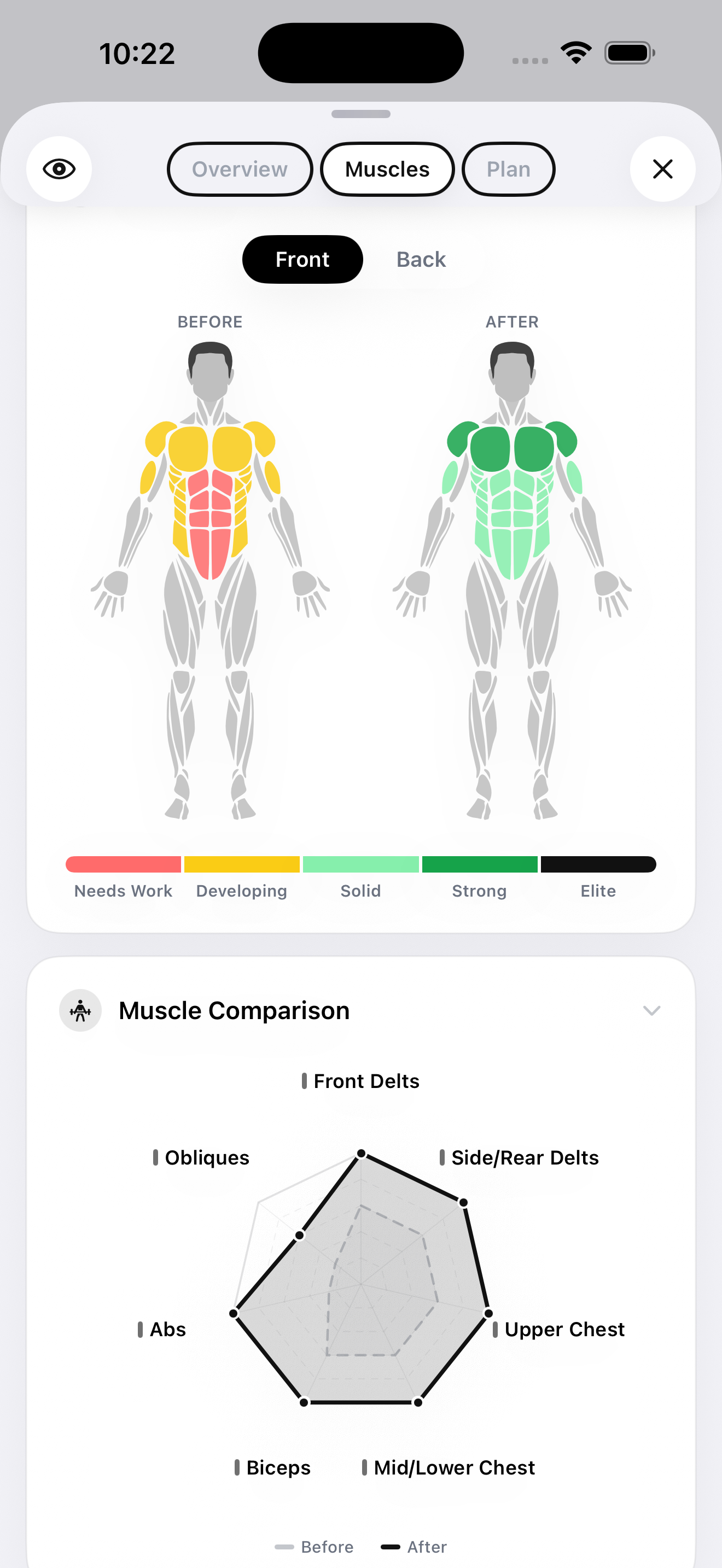
That per-area breakdown is the whole game. A regular body fat number tells you the average across your whole body. The muscle map tells you that your shoulders are up 8 points since January but your quads are flat — which means your push days are working and your leg day needs more volume. That's actionable information that no other photo tracker produces.
GainFrame integrates directly with Hevy. When you open any progress photo, you see the workout you did that day — exercise names, sets, reps, total volume — pinned to the image. It also pulls in weight and activity data from Apple Health. The result is a check-in screen that shows you, in one frame, what your body looks like, what it weighs, and what you trained.
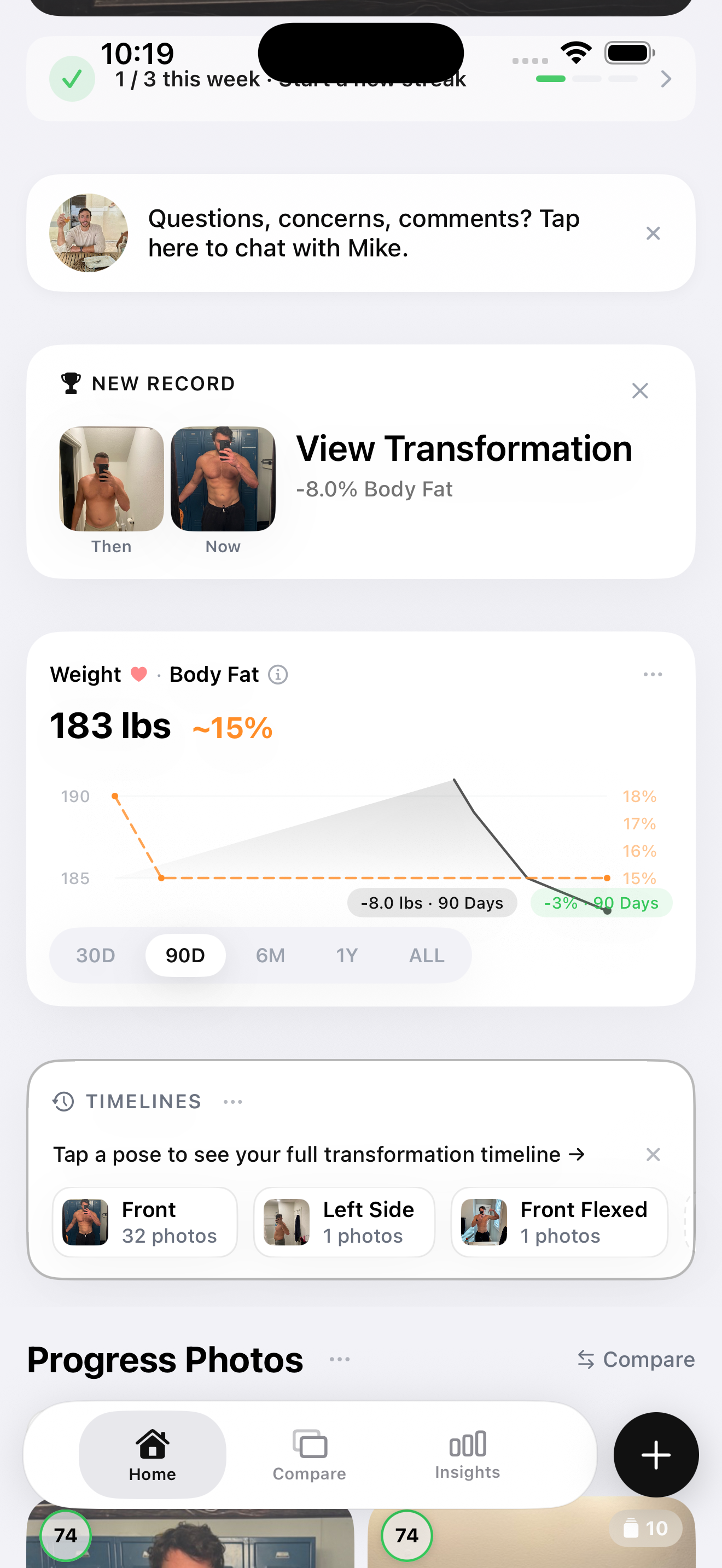
The dashboard tracks GainFrame Score (0–100), body fat, and FFMI over a longitudinal timeline. Throwback comparisons surface relevant past photos automatically. A Deep Dive AI report between any two photos breaks down exactly what shifted — which areas grew, which lost definition, where posture changed.
One trade-off worth being honest about: AI photo analysis is a visual estimate, not a clinical measurement. Body fat readings won't match a DEXA exactly, particularly at the extremes. What it does well is track change with high frequency at near-zero friction — which is the metric that actually matters for lifters who want to see whether a training cycle is working.
Best for: Lifters who already log workouts and want their physique data on the same level of detail as their training data.
Limitations: iOS only. Free tier capped at 25 photos lifetime.
2. Hevy — Best for lifters who want photos in their workout log
Price: Free with Pro subscription
Platform: iOS + Android
Hevy is the best lifting tracker on the market in 2026. Clean interface, fast set logging, solid progressive overload tracking, open data. If you're not already logging workouts in something, this is what you should be using.
Photos are a secondary feature — you can attach an image to a workout, and that's the extent of it. There's no body fat estimation, no muscle scoring, no longitudinal physique tracking. What you get is a journal entry: "this is what I looked like after I deadlifted 405 for the first time."
That's not a knock. Hevy isn't trying to be a physique tracker. It's the ground truth for your training data, and it stays in its lane. Where it gets powerful is when it's paired with something that does track physique — which is why GainFrame's Hevy integration exists. Hevy logs the lifts. GainFrame measures what those lifts produced.
Best for: Lifters who want a single source of truth for their training, with photos as a secondary attachment.
Limitations: No body composition, no muscle scoring, no AI analysis. Photos are journal entries, not data.
3. MacroFactor — Best for nutrition-first lifters
Price: Subscription
Platform: iOS + Android
MacroFactor is the rare nutrition app built by people who actually understand the math. It auto-adjusts your calorie target based on your real-world rate of weight change, which is dramatically better than the static targets most apps hand you. The recent addition of progress photo support and body metrics tracking turned it from a pure macro tracker into a more complete physique tool.
Photos in MacroFactor are tied to your weigh-in entries, so you can correlate visual change with caloric intake and weight trend. It's the right model for someone whose primary discipline is nutrition — your photos sit next to your protein average and your weekly calorie balance.
What it doesn't do is AI body composition or muscle scoring. The photo feature is a journal layer on top of an excellent macro engine, not a tracking system in its own right. For nutrition obsessives, that's the correct trade — you don't need a separate app to tell you how your training looks if you're already getting the diet side right.
Best for: Lifters whose primary discipline is nutrition and who want photos tied to their macro log.
Limitations: No AI body composition or per-muscle scoring. Pair it with a dedicated physique tracker for a complete picture.
4. Strong — Workout tracker with photo notes
Price: Free with Pro subscription
Platform: iOS + Android
Strong is one of the longer-tenured workout trackers and still has a loyal user base. The set logging is fast, the templates are easy to manage, and the workout history is solid. If you've been logging in Strong for years, your workout data is portable enough that you don't need to switch unless you want to.
Like Hevy, photos are an attachment feature — you can add an image to a workout entry, and that's the extent of the photo support. No body fat estimation, no muscle map, no longitudinal physique view. The same logic applies: use Strong as your training tracker, layer a dedicated physique app on top.
Best for: Existing Strong users who want photo notes alongside their lifting data.
Limitations: No physique tracking. Photos are journal-level only.
5. Metamorph — Pure photo alignment, no gym data
Price: Subscription
Platform: iOS
Metamorph is what happens when an app does one thing well and refuses to do anything else. It's a photo alignment tool — ghost overlays, consistent framing, side-by-side exports. The visual result of a Metamorph comparison is genuinely good, and if all you want is a clean before-and-after for social, it does that job.
What it doesn't do is anything gym-specific. There's no body fat tracking, no muscle scoring, no workout integration, no body composition data of any kind. It's a camera utility with a timeline, not a tracker.
For lifters specifically, that's a problem. The whole point of taking a progress photo as a serious gym-goer is to verify what your training is producing. A perfectly aligned pair of photos with no data attached doesn't answer that question — it just makes the eyeballing prettier.
Best for: People who want clean side-by-side photos and nothing more.
Limitations: No body fat, no muscle scoring, no workout integration. Pure photo utility.
6. Shapez — Photos plus tape-measure tracking
Price: Subscription
Platform: iOS
Shapez sits in the middle ground: progress photos plus manual measurement entry. You log your photos and then enter circumference measurements — chest, waist, arms, thighs — to track size changes alongside the visual record.
For lifters who already take tape measurements consistently, this works. Circumference data is reliable when it's collected the same way every time, and it sidesteps the accuracy questions that come with AI estimation. The trade is friction: every check-in requires a tape measure and several minutes of careful logging, which is why most people who try it don't sustain it past a few weeks.
There's no AI body fat estimation, no muscle scoring, and no workout integration. The data depth comes from your willingness to do the manual entry.
Best for: Lifters who already do consistent tape measurements and want a single place to log them.
Limitations: No AI analysis or muscle scoring. Manual entry friction limits real-world consistency.
7. Fitbod — Workout planner with photo support
Price: Subscription
Platform: iOS + Android
Fitbod is a workout planner first — it generates training sessions for you based on your equipment, fatigue, and goals. The progress photo feature is a recent addition that lets you attach images to your workout history.
If you're someone who needs the program written for you, Fitbod is the most polished option in that category. The photo feature, like with Hevy and Strong, is a journal layer rather than a tracking system. No body fat, no muscle scoring, no longitudinal physique data.
Best for: Lifters who want a planner-driven workout flow with photos attached as journal entries.
Limitations: No physique tracking depth. Photos are notes, not data.
How to choose: a decision guide
The trap most lifters fall into is treating these apps as competitors. They're not. The serious move is stacking — pick the tool that owns each domain and let them integrate.
If you log every set: Use Hevy as your workout tracker, GainFrame as your physique tracker. Hevy data flows directly into GainFrame so every photo carries your workout context. This is the cleanest stack for someone whose primary lens is training volume.
If you log macros: Use MacroFactor for nutrition and weight, GainFrame for AI body composition and muscle scoring. MacroFactor handles the input side (calories in, weight out), GainFrame handles the output side (what those calories actually built).
If you just want photos with real data: Use GainFrame on its own. The Apple Health integration covers basic activity and weight without forcing you into another app, and the AI does the heavy lifting on body composition.
If you only care about social-ready before-and-afters: Use Metamorph. Don't pretend it's a tracking system.
If you need a workout planner: Use Fitbod or a Hevy program. Then layer GainFrame on top — neither is built to track your physique.
The honest take on Hevy vs GainFrame
One thing worth being direct about: people sometimes ask whether Hevy and GainFrame are competitors. They're not. They're complements, and treating them as alternatives misses the point.
Hevy logs what you did in the gym — sets, reps, volume, PRs. It's the system of record for your training inputs. GainFrame measures what those inputs produced — body fat, FFMI, per-muscle development. It's the system of record for your physique output.
The reason they integrate is that one without the other only tells you half the story. If you're doing the work in the gym, you should be measuring whether the work is producing what you want. If you're tracking your physique, you should be doing it in context with the training that drove the change.
That's the actual answer to "what's the best gym progress photo app." It's not a single app. It's a stack — Hevy for training, GainFrame for physique, integrated so both views live in the same place.
The mirror lies because of lighting. The scale lies because of water. Workout logs alone don't tell you whether your training is producing visible results. Stack the tools that each own one domain and you stop guessing.
Track Your Gym Progress with Real Data — Free on iPhone
GainFrame analyzes every progress photo with AI to give you a body fat estimate, FFMI, and muscle scoring across 12 body areas. Hevy and Apple Health integration pin your workout volume and weight to every check-in. Photos stay on-device. Free tier includes 25 photos.
Download GainFrame Free