
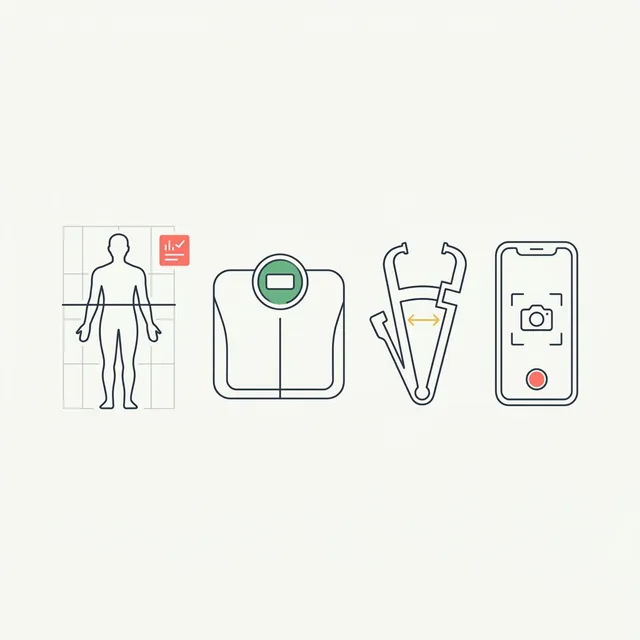
Quick answer: The best body composition app depends on your hardware. GainFrame estimates body fat, FFMI, and 12 muscle scores from a phone photo on iOS. Spren does front and back photo analysis. ZOZOFIT and Bodymapp handle 3D scans. FitTrace tracks DEXA results. Smart scale apps are the cheapest entry point.
Your smart scale says 22% body fat. The InBody machine at your gym says 18%. Your trainer's calipers say 20%. Which one is right?
Probably none of them are perfectly accurate. And that's not a bug. It's just how body composition measurement works. Every tool uses a different method, makes different assumptions about your body, and has a different margin of error. When you compare readings across methods, you're not comparing the same thing.
This guide cuts through the confusion. We'll cover seven tools and apps, from free to $500+, and tell you exactly what each one is good for, what it can't do, and who should actually use it.
Considering a specific phone scanner? The WeightWatchers scanner evaluation covers its cited evidence, while the ZOZOFIT review explains the current app-only, free, and Premium options.
For the training and nutrition records around your check-ins, see the Gravl trial checklist and Cronometer versus MacroFactor comparison. These answer product-selection questions beyond the composition-app roundup.
Managing other people’s check-ins adds a different set of requirements. Our body-scanning platforms for coaches comparison covers scan capture, client reports and the distinction between photo uploads and automated measurement.
How to Read This Guide
These tools exist on a spectrum of accuracy vs. accessibility. At one end: clinical DEXA scans, expensive but extremely precise. At the other: AI photo analysis, free but relying on visual estimation rather than direct measurement. In between: 3D scanners, bioimpedance devices, and companion apps to gym equipment.
The honest framing is simple: accuracy scales with price and friction. But for most gym-goers, the real question isn't which tool is most accurate in a lab. It's which tool you'll actually use consistently enough to see meaningful trends.
We'll cover method, pricing, platform, and ideal use case for each. Then a quick decision guide at the end based on your situation.
Quick Comparison: Body Composition Apps at a Glance
| App / Tool | Method | Price | Platform | Best For |
|---|---|---|---|---|
| GainFrame | AI from photos | Free / $5.99 mo | iOS | Daily visual progress tracking |
| Spren | Front/back photo AI | ~$50 one-time | iOS + Android | Periodic body fat assessments |
| ZOZOFIT | 3D scan (app-only or suit) | Free core scans; Premium $4.99/mo | iOS + Android | Detailed body shape & circumference |
| Bodymapp | 3D scan from video | Subscription | iOS + Android | 3D body visualization |
| FitTrace | DEXA result tracker | Free | iOS + Android | People who do regular DEXA scans |
| InBody App | Bioimpedance (gym machine) | Free | iOS + Android | Gyms with InBody machines |
| Smart Scales | Bioelectrical impedance | $30 to $150 hardware | iOS + Android | Weight trend tracking only |
1. GainFrame: AI Body Composition from Photos (iOS)
Price: Free (25 photos lifetime) | Pro: $5.99/mo or $39.99/yr
Platform: iOS only
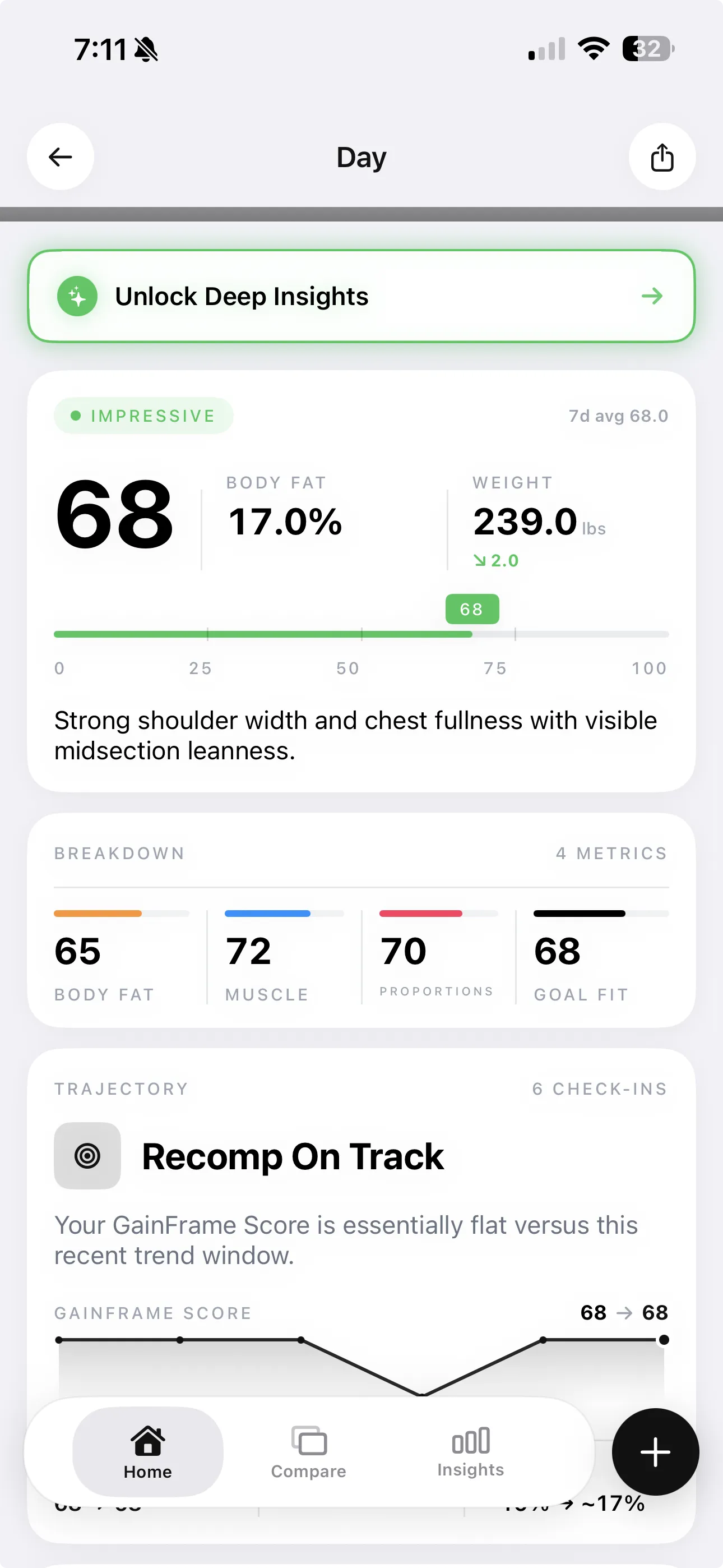
GainFrame uses Google Gemini AI to analyze progress photos and estimate body composition metrics, including body fat percentage, FFMI, and a muscle map across 12 body areas. You take a photo, and within seconds you get a GainFrame Score (0 to 100), detailed muscle group breakdown, and trend data over time.
There are a few things worth being honest about. AI photo analysis is not the same as DEXA or a 3D scanner. It's a visual estimation, not a physical measurement. Body fat readings can have a wider margin of error than clinical methods, particularly for people at very high or very low body fat levels.
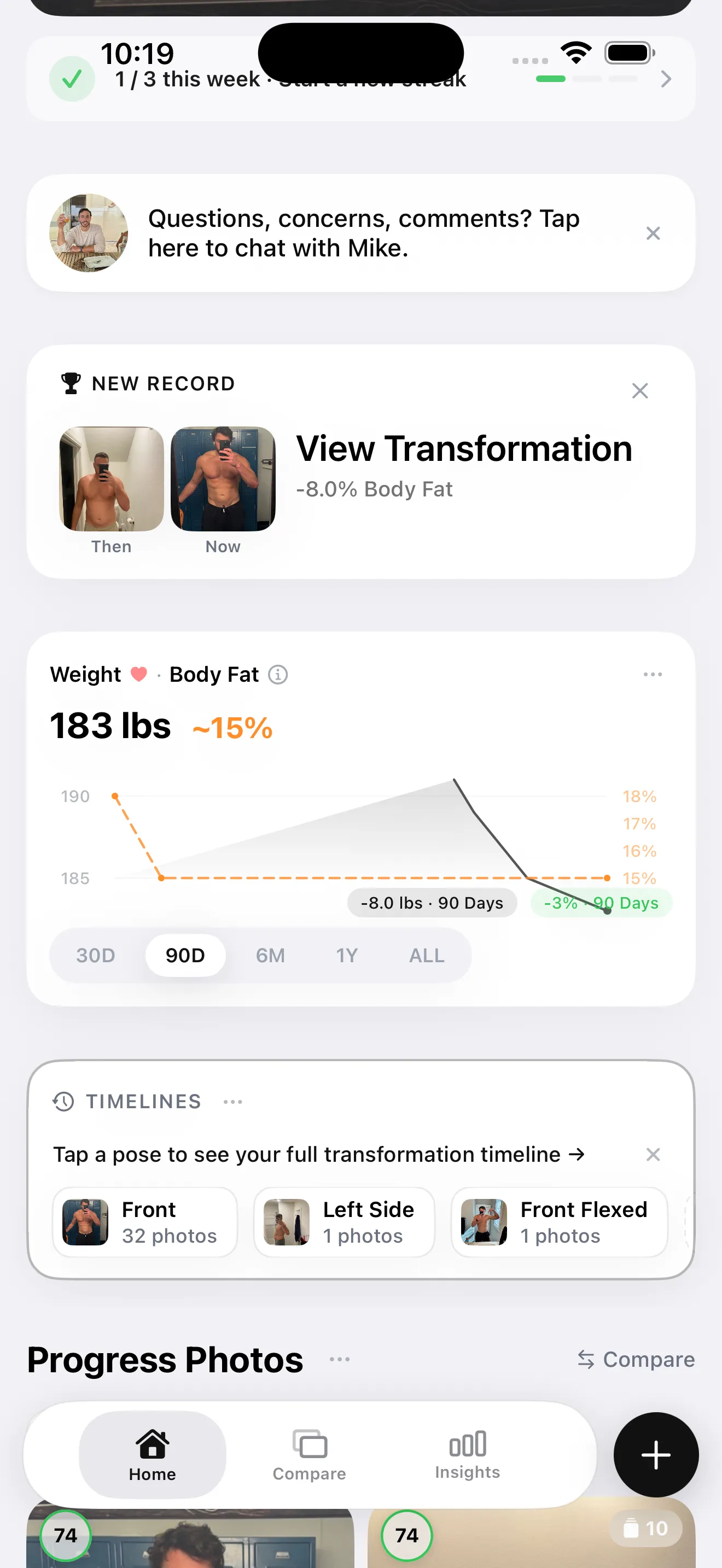
What GainFrame does exceptionally well is tracking change over time. Because it takes only a photo and costs nothing on the free tier, the barrier to checking in daily is essentially zero. Side-by-side comparisons, a Throwback feature that surfaces photos from weeks or months ago, and a Deep Dive AI report give you a detailed read on what's actually shifting in your physique.
Privacy is a genuine differentiator here. All photos and data are stored on-device via SwiftData, and no account is required. Photos are sent to Google's Gemini API for AI analysis but are never persisted on any server. There's no sign-up, no cloud sync, no photo library access beyond the check-in moment.
The dashboard tracks GainFrame Score, body fat, and FFMI over time. The app also includes a Future You projection, weight tracking with Apple Health integration, and Throwback comparisons that automatically surface relevant past photos.
Best for: iPhone users who want daily or weekly tracking without buying any hardware. It's the only free tool that gives you AI-powered visual feedback on every check-in.
On Android or desktop? The free browser body fat estimator gives you the same AI estimate from one photo a day, no app required.
Limitations: iOS only. It is not a physical measurement device, and accuracy is lower than DEXA or a 3D scanner. Free tier is capped at 25 photos lifetime.
2. Spren: Front/Back Photo Analysis
Price: ~$50 one-time purchase
Platform: iOS + Android
Spren asks you to take a front and back photo in form-fitting clothing, then runs an AI analysis to estimate body fat percentage and other composition metrics. It's built around periodic assessments, so you do a proper Spren session every few weeks rather than snapping a photo every day.
The one-time purchase model is appealing if you want a no-subscription tool for occasional check-ins. Spren's photo methodology requires more intentional setup than a casual progress photo. Specific lighting, clothing, and positioning matter more here.
Best for: People who want structured, periodic body fat assessments and prefer a one-time payment over a subscription.
Limitations: Not designed for daily tracking. Requires consistent conditions to produce comparable readings across sessions. Same fundamental limitation as all photo-based AI: it's an estimate, not a direct measurement.
3. ZOZOFIT: App-Only or ZOZOSUIT 3D Scanning
Price: Free core scans | Premium: $4.99/mo, $29.99/yr, or $99.99 lifetime | Optional ZOZOSUIT: $99.99 with lifetime Premium
Platform: iOS + Android
ZOZOFIT now supports two scanning workflows. Its app-only option uses your phone's front-facing camera while you wear your own form-fitting clothes. The optional ZOZOSUIT uses marker-covered clothing and the back-facing camera. ZOZOSUIT owners can use either method, according to the company's current workflow guide.
The current App Store listing reports measurements at 16 body sites, along with a 3D model, body-fat calculation, and progress views. That makes it useful for monitoring whether specific circumferences appear to be moving during a cut, bulk, or recomp.
Core scans and tracking are free. ZOZOFIT's official plan page lists Premium at $4.99 monthly, $29.99 annually, or $99.99 for lifetime access. The optional ZOZOSUIT costs $99.99 and includes lifetime Premium after your first suit scan.
Circumference and body-fat values are software estimates, not direct tissue measurements. Clothing, posture, phone position, and camera distance become part of the test, so changing your setup can move the result.
Best for: People who want a 3D body model and recurring circumference estimates at 16 reported sites, without requiring special hardware.
Limitations: App-only scans are setup-sensitive, so repeat scans need consistent clothing, posture, phone position, and distance. The suit is optional, but adds cost and a more involved scan ritual. Treat the output as progress-tracking estimates rather than a replacement for DEXA or clinical measurements.
4. Bodymapp: 3D Body Scan from a Selfie Video
Price: Subscription (pricing varies by plan)
Platform: iOS + Android
Bodymapp generates a 3D body model from a short selfie video, with no special suit required. You rotate slowly in front of the camera, and the app builds a 3D visualization of your body shape with circumference estimates.
The 3D visualization is genuinely compelling for seeing body shape changes that a flat photo misses. It's also used in corporate wellness programs, which is where much of its distribution comes from.
Best for: People who want 3D body visualization without purchasing hardware, or corporate wellness use cases.
Limitations: Scan quality depends heavily on lighting, clothing, and the phone camera. Circumference estimates are less precise than ZOZOFIT's dot-marker approach. Subscription model means ongoing cost.
5. FitTrace: DEXA Scan Tracker
Price: Free
Platform: iOS + Android
FitTrace doesn't measure your body composition itself. It helps you track the results from DEXA scans over time. If you're doing quarterly DEXA scans, FitTrace gives you a place to log those results, visualize trends in lean mass, fat mass, and bone density, and see how your composition is shifting between scans.
It's a companion app for a clinical process, not a standalone tool. Without access to a DEXA facility, it's not useful. But for people who already invest in regular DEXA scans, it fills a real gap because DEXA facilities rarely give you longitudinal tracking software.
Best for: Serious athletes or physique competitors who do regular DEXA scans and want longitudinal data tracking.
Limitations: Completely dependent on access to a DEXA facility. DEXA scans typically cost $100 to $200 each, making frequent use expensive. Not useful as a standalone app.
6. InBody App: Companion to Gym Machines
Price: Free (machine access required)
Platform: iOS + Android
InBody makes the segmental bioimpedance machines you've probably seen at higher-end gyms and medical offices. The InBody app is a companion that connects to those machines via QR code to store and track your results over time.
InBody machines are significantly more accurate than home smart scales because they use multi-frequency bioimpedance measured at multiple points on your body simultaneously, rather than a single impedance reading through your feet. They produce a full body composition report including segmental lean mass by limb.
The limitation is obvious: you need access to an InBody machine, which costs several thousand dollars. Some gyms include scans for members; others charge $25 to $50 per session.
Best for: Gym members with InBody machine access who want to track results over multiple sessions.
Limitations: Hardware-dependent. Results vary based on hydration, time of day, and when you last ate. The same factors affect all bioimpedance tools. Less accurate than DEXA for absolute body fat numbers.
7. Smart Scale Apps (Fitbit, Wyze, Renpho)
Price: $30 to $150 for the scale hardware
Platform: iOS + Android
Smart scales like the Renpho, Withings Body+, Fitbit Aria, or Wyze Scale use bioelectrical impedance analysis (BIA). They send a small electrical current through your body and estimate fat mass based on resistance. Most pair with companion apps that track weight, estimated body fat, BMI, and other metrics over time.
Here's the honest truth about smart scale body fat readings: they're often wildly inaccurate on an absolute basis. Studies consistently show errors of 5 to 8 percentage points compared to DEXA, and readings fluctuate significantly based on hydration, time of day, and recent food intake. The same person can get readings of 18% and 24% on the same scale in the same day.
What smart scales are genuinely good for is weight tracking. Daily weigh-ins logged over weeks and months produce useful trend data. If you care about the number on the scale and want to see how it moves over time, a smart scale with its app is a perfectly valid tool. Just ignore the body fat percentage.
Best for: Weight trend tracking. Anyone who wants daily weigh-in data without expensive hardware.
Limitations: Body fat readings are unreliable for absolute measurement. Do not compare readings from one scale to another, or use them to make decisions about training without understanding the margin of error.
Which Tool Is Right for You?
Here's a quick decision guide by situation:
You want to track daily visual progress at no cost: Start with GainFrame on iOS. The free tier gives you 25 photos, which is enough to see whether the tool works for you. The AI feedback is immediate and the streak-based check-in system makes it easy to build a habit.
You want the most accurate body fat reading available: Book a DEXA scan. A dual-energy X-ray absorptiometry scan at a sports medicine or imaging facility runs $100 to $200 and gives you the gold standard in body composition data: fat mass, lean mass, and bone density by region, with an error margin of 1 to 2%.
You want recurring circumference estimates and a 3D body model: ZOZOFIT offers app-only core scans for free and reports measurements at 16 body sites. Standardize your clothing, posture, phone position, and distance before comparing scans. Its values are estimates, not a substitute for DEXA or a clinical measurement.
You already do DEXA scans and want to track results: Add FitTrace. It's free and solves a real problem: DEXA results sitting in a PDF folder with no longitudinal view.
Your gym has an InBody machine: Use the InBody app. It takes 30 seconds per scan and gives you multi-segment body composition data that's significantly more accurate than a home smart scale.
You just want to track your weight: Any smart scale with its companion app works fine. Don't pay attention to the body fat percentage number.
The Frequency Problem Most People Overlook
Here's a question worth sitting with: how often are you actually going to use whichever tool you choose?
DEXA scans are the most accurate method available. But most people do one or two per year, if that. At $150 per scan, quarterly tracking costs $600 annually, and between scans, you have no data.
A 3D body scanner like ZOZOFIT still requires setup: a propped phone, form-fitting clothing, and consistent positioning. The suit is optional. Realistically, that may make it a monthly measurement for many people, even though the app supports more frequent scans.
AI photo analysis takes about 30 seconds. The barrier to a daily or weekly check-in is essentially zero. And while each individual reading may be less precise than a DEXA result, 52 data points per year, even with moderate noise, tells a clearer story than 2.
The best tracking tool isn't the one with the smallest margin of error on a single reading. It's the one you actually use consistently enough to see trends. That's the compounding advantage of high-frequency, low-friction measurement: you catch plateaus faster, you see momentum building before the scale reflects it, and you accumulate evidence of progress that motivates continued effort.
For most gym-goers, the practical answer is layering: use a free or low-cost tool for frequent trends, repeat ZOZOFIT scans under standardized conditions for circumference estimates, and use an occasional DEXA scan when you need a clinical reference point. Keep each method in its own trend line because their absolute numbers are not interchangeable.
What Should You Know About Body Composition Apps?
What is the best body composition app?
The best app depends on the data you need and the setup you will repeat. Photo apps suit frequent visual check-ins. ZOZOFIT and Bodymapp add 3D shape and circumference estimates. InBody and smart-scale apps require hardware, while FitTrace is useful only if you already receive DEXA results.
Can ZOZOFIT scan without the suit?
Yes. ZOZOFIT's app-only workflow uses your phone's front-facing camera while you wear your own form-fitting clothes. The optional ZOZOSUIT uses marker-covered clothing and the back-facing camera. You do not need the suit for core scans, although buying it includes lifetime Premium after your first suit scan.
Is ZOZOFIT free?
ZOZOFIT offers free core body scans and tracking. Its official plan page lists Premium at $4.99 per month, $29.99 per year, or $99.99 for lifetime access. The optional ZOZOSUIT currently costs $99.99 and includes lifetime Premium, so it is hardware plus plan access rather than a required purchase.
Are body composition app estimates accurate?
Treat readings from consumer body composition apps as estimates. Photo tools depend on pose and lighting, 3D scans depend on clothing and phone setup, and bioimpedance changes with hydration and meal timing. Consistent conditions make trends more useful, but DEXA or another clinical method is more appropriate when you need a medical or precise baseline.
How often should you measure body composition?
For most people, weekly or monthly measurements are easier to interpret than daily body-fat estimates. Use the same tool, time of day, clothing, posture, and setup each time. Daily weight can still be useful when averaged across a week, but body composition changes slowly enough that frequent noisy readings may hide the real trend.
Track Your Body Composition Daily, Free on iPhone
GainFrame uses AI to analyze your progress photos and give you a GainFrame Score, body fat estimate, FFMI, and 12-area muscle map after every check-in. No equipment, no account, no photos stored on a server. Free tier includes 25 photos.
Download GainFrame Free