
Quick answer: Take progress photos with the same camera, lighting, distance and pose each time. Place your phone securely at torso height, use a timer or video, and capture relaxed front, side and back views. Save the dates, then compare matching poses several weeks apart. A tripod is optional if your phone is stable.
You have 20 gym selfies and still cannot find two that line up. One is flexed, one crops your legs, and another was taken under a spotlight. Start with a setup you can repeat next week.
How do you set up your phone by yourself?
Choose a plain wall with enough room to fit your whole body. Place the phone on a stable shelf, a phone stand or a tripod at roughly torso height. Keep the lens level instead of pointing it up from the floor.
Mark your standing position and the phone position with removable tape. Use the same lens and zoom setting next time. Take a test frame and check that your head and feet fit with a little space around them.
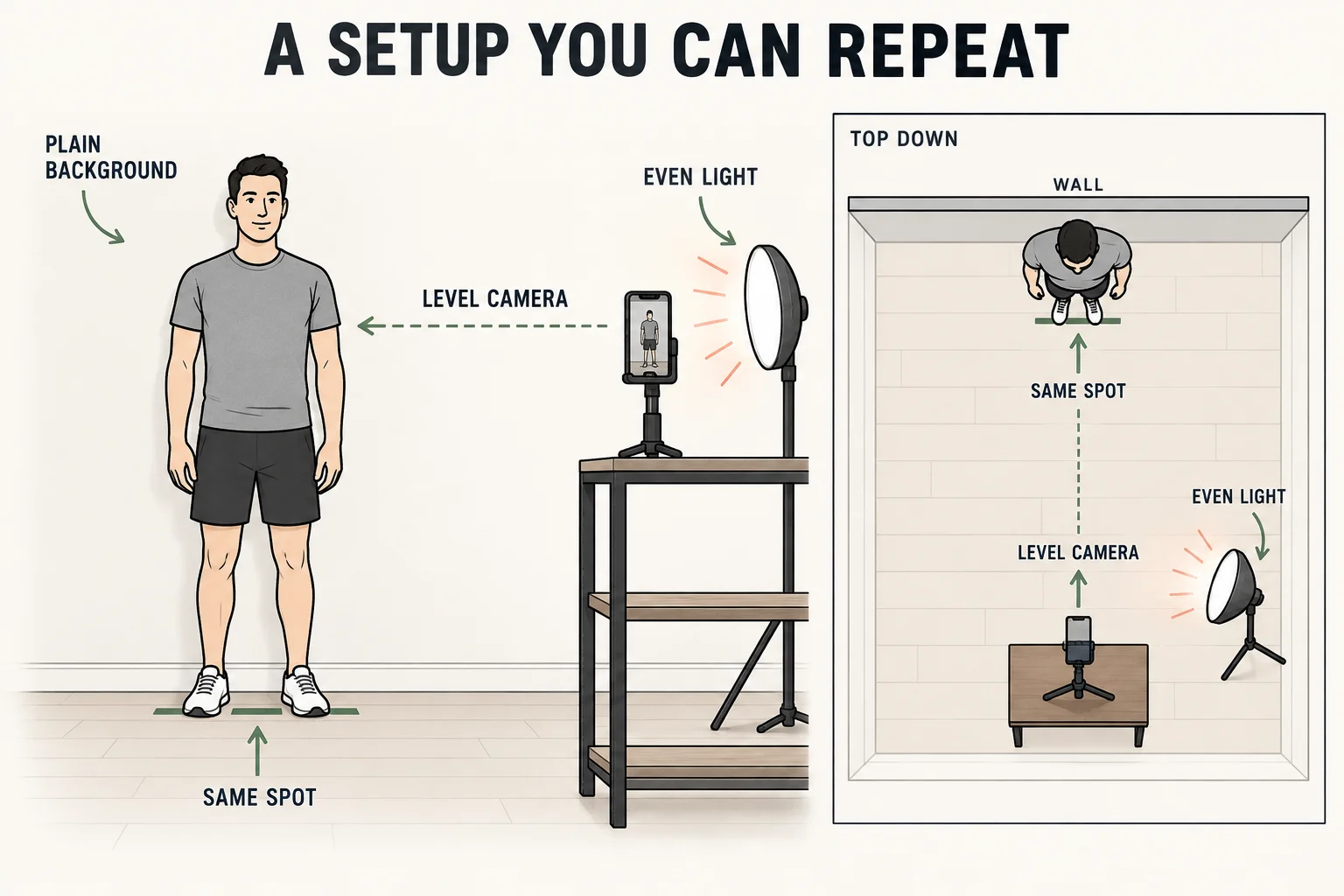
Illustrated setup guide. A stable shelf or stand works; you do not need a full-size tripod.
Use the camera timer long enough to reach your mark without rushing. If the timer is awkward, record a short video while you hold each pose still, then select clear frames. Video frames may have less detail than still photos, so keep your chosen method consistent.
For a checklist tailored to your room and equipment, build your photo setup.
A marked camera position also supports a consistent photo routine for 75 Hard or 75 Soft. Set it up before day one so later pictures use the same framing without extra daily decisions.
Which gym progress-photo poses should you take?
Start with relaxed front, side and back photos. Keep your arms in the same position, stand naturally and breathe normally. Choose one side and use it consistently.
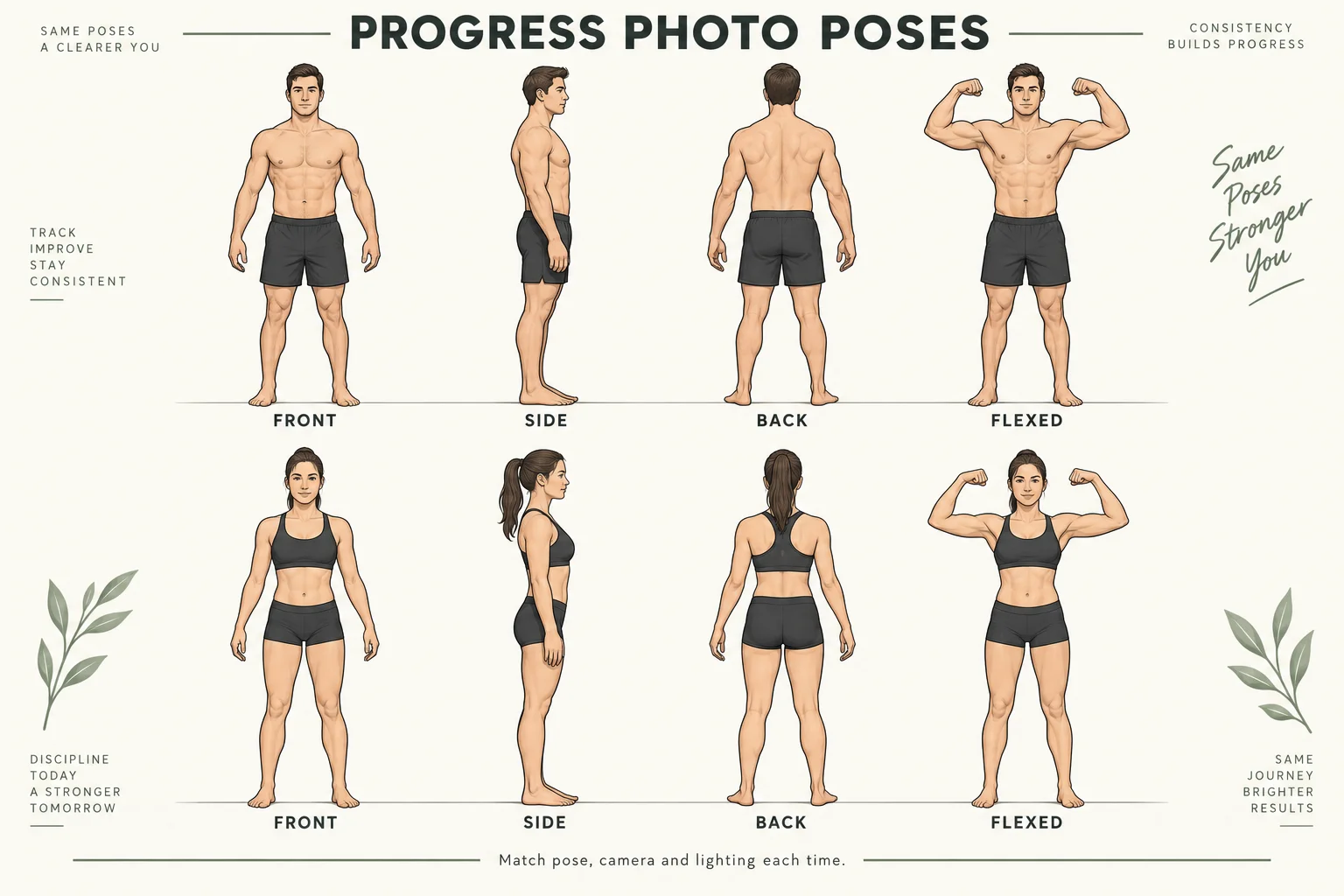
Illustrated pose reference. Front, side and back form the baseline set; keep flexed photos in their own comparison.
A flexed photo can record visible muscle detail, but compare it with the same flex. Our progress-photo pose guide includes a printable contact sheet and the common mistakes for each angle.
What lighting works for progress photos?
Use even light coming from near the camera, such as a window behind the phone. Avoid a bright window behind your body. Choose a time and room where you can reproduce the light direction.
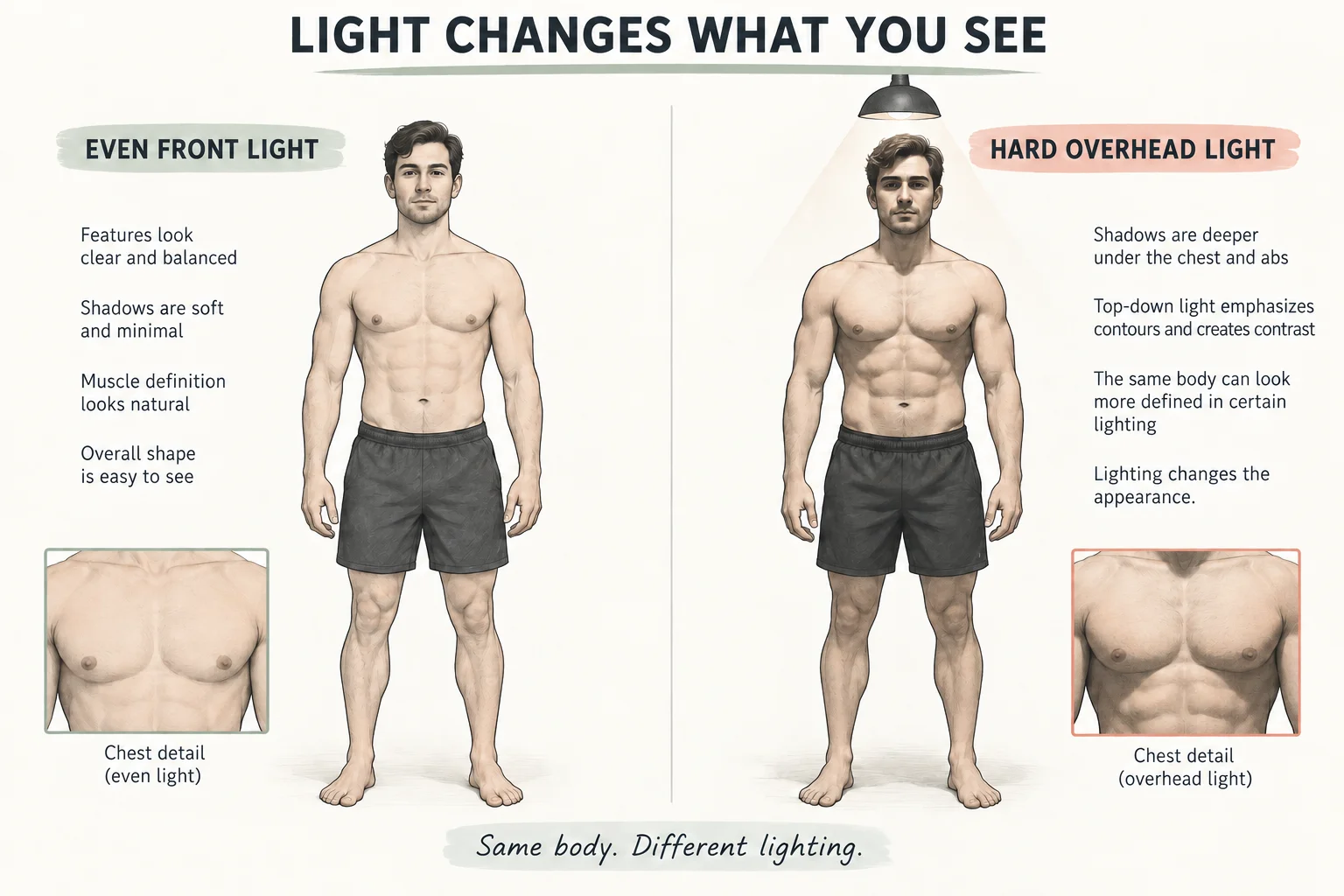
AI-generated educational illustration of lighting effects. These are illustrative drawings, not real before-and-after results.
Hard overhead gym lighting can emphasize contours. If that is your only available setup, use the same spot each time and record the conditions. Keep relaxed baseline photos separate from post-workout photos taken with a pump.
MacroFactor's photo guidance also emphasizes consistent conditions and enough time between meaningful comparisons.
Can you take useful photos without a tripod?
Yes. A stable shelf at a suitable height works. Keep the phone away from edges and wet surfaces, then check the full frame before starting the timer.
A mirror selfie is another option when that is the setup you can repeat. Keep the phone at the same height and on the same side, use the same mirror, and avoid twisting toward it. A fixed camera makes a relaxed back photo easier because neither hand needs to hold the phone.
How do you compare your first two photo sets?
Open the free tool to compare your gym progress photos. Choose the same pose from two dates, then use the scale and position controls to bring your head, shoulders and feet into comparable positions. Ghost overlay helps you notice when the camera distance changed.
For a worked example, suppose your newer photo makes you look wider everywhere, including your head. Reduce that image's scale until the head and shoulder landmarks line up, then compare again. If the apparent difference largely disappears, framing was a plausible explanation.
Use the side-by-side or wipe view to inspect the remaining differences. Export a PNG if you want a saved comparison. The browser tool processes those photos locally and does not store a dated library for future check-ins.
What should you check before saving?
- Your entire body fits in the frame.
- Front, side and back images use the same camera position.
- Lighting and clothing resemble your previous set.
- Relaxed and flexed images have clear labels.
- The original capture date is recorded.
First, keep one usable set. Second, choose a progress-photo schedule. Third, use a dedicated album or one of these progress photo apps to find matching dates without searching the whole camera roll.
What else should you know?
How do you take progress photos by yourself?
Place your phone securely at torso height, frame your whole body, and use a timer or record a short video. Mark where you stand so you can return to the same spot. Take relaxed front, side and back views, then save the date and repeat those conditions next time.
Should gym progress photos be flexed or relaxed?
Use relaxed front, side and back photos as your baseline set. You can add a flexed photo to show muscle detail, provided you repeat the same flex later. Keep those comparisons separate because a stronger flex, different posture or a post-workout pump can change how your physique appears.
What is the best camera angle for progress photos?
A level camera around torso height is a practical starting point. Position it far enough away to fit your head and feet without tilting the phone or changing lenses. The exact height matters less than recording a setup that lets you reproduce the same angle and framing every time.
Can you take progress photos without a tripod?
Yes. A stable shelf, desk or phone stand can hold the camera if it gives you a clear full-body frame. Use a timer and check that the phone cannot slip. Mirror selfies can also work, although keeping the phone position, arm position and torso angle consistent takes more care.
How do you compare progress photos fairly?
Choose matching poses from different dates and check the lighting, clothing, camera height and scale before interpreting changes. Align clear landmarks such as the shoulders and feet. Keep the original images, and compare several weeks of context so a single unusual photo does not drive your conclusion.
Build a repeatable photo routine.
GainFrame helps you keep dated check-ins and compare changes over time. Start within the app's free capture and import allowance; Pro expands access and unlocks advanced analysis.
Download GainFrame Free