Most "best progress photo app" lists are written platform-blind. They rank the same seven apps, half of which are Android-first ports, and they ignore the half-dozen iOS features that genuinely change how the experience feels day to day. If you're on iPhone, that's a wasted lens.
iOS has a stack of features no other platform can match for this use case: HEIC photos that take roughly half the storage of JPEG without losing quality, iCloud Photos sync that keeps your archive available on every device you own, the Hidden Album that lets you wall off body shots behind Face ID, Apple Shortcuts that can fire a recurring "log my check-in" routine at 7am, Live Photos that let you pick the best frame after the shutter, AirDrop for one-tap sharing, and Apple Health for writing body composition straight into the OS-level health record.
This is a ranked review of the seven apps actually worth considering on iPhone in 2026, judged on how well they use that stack — not just on whether they store photos. Honest take up front: GainFrame is what we build, and it's not automatically #1. Apple Photos with the Hidden Album is a legitimately good answer for many people, and we say so below.
What makes a progress photo app actually good on iPhone
Before the rankings, here's the iOS-specific scorecard that matters. If an app doesn't hit at least three of these, it's probably been ported from Android and isn't taking advantage of the platform you're paying for.
- HEIC support. iOS shoots in HEIC by default — roughly half the file size of JPEG with the same visual quality. An app that re-encodes to JPEG silently doubles your storage footprint and degrades the image. The good ones store HEIC end to end.
- iCloud Photos sync. If your photos live inside the app's private container only, you lose them when you change phones unless the app builds its own sync. iCloud Photos handles it for free across every device you've ever signed into. Apps that write to your Photos library — or at least back up to iCloud Drive — survive the device transition.
- Apple Shortcuts. The killer iOS feature for habit-building. A Shortcut can fire at 7am every weekday, open the camera, and tag the resulting check-in. Apps that expose Shortcuts actions turn a daily intention into a one-tap routine.
- Apple Health writes. Body fat percentage, lean body mass, and weight all have native HealthKit categories. Writing to Health means your data shows up alongside steps, sleep, and resting heart rate — and feeds into anything else that reads HealthKit.
- Apple Watch companion. Optional but valuable for setting a reminder that taps your wrist instead of pinging your phone.
- AirDrop and Photos integration. If you want to send a side-by-side to your coach, or scrub through a year's worth of photos on your iPad, the app needs to play with the rest of the iOS share sheet.
- Live Photos handling. A Live Photo captures 1.5 seconds before and after the shutter. For a flexed pose, that's the difference between a perfect frame and an almost-perfect one. Apps that preserve Live Photos let you pick the right frame after the fact.
Below, every app gets graded against this scorecard.
The 7 best progress photo apps for iPhone, ranked
1. GainFrame — Best for serious gym-goers who want photos plus body composition
Price: Free (25 photos lifetime) | Pro: $4.99/mo
Platform: iPhone only
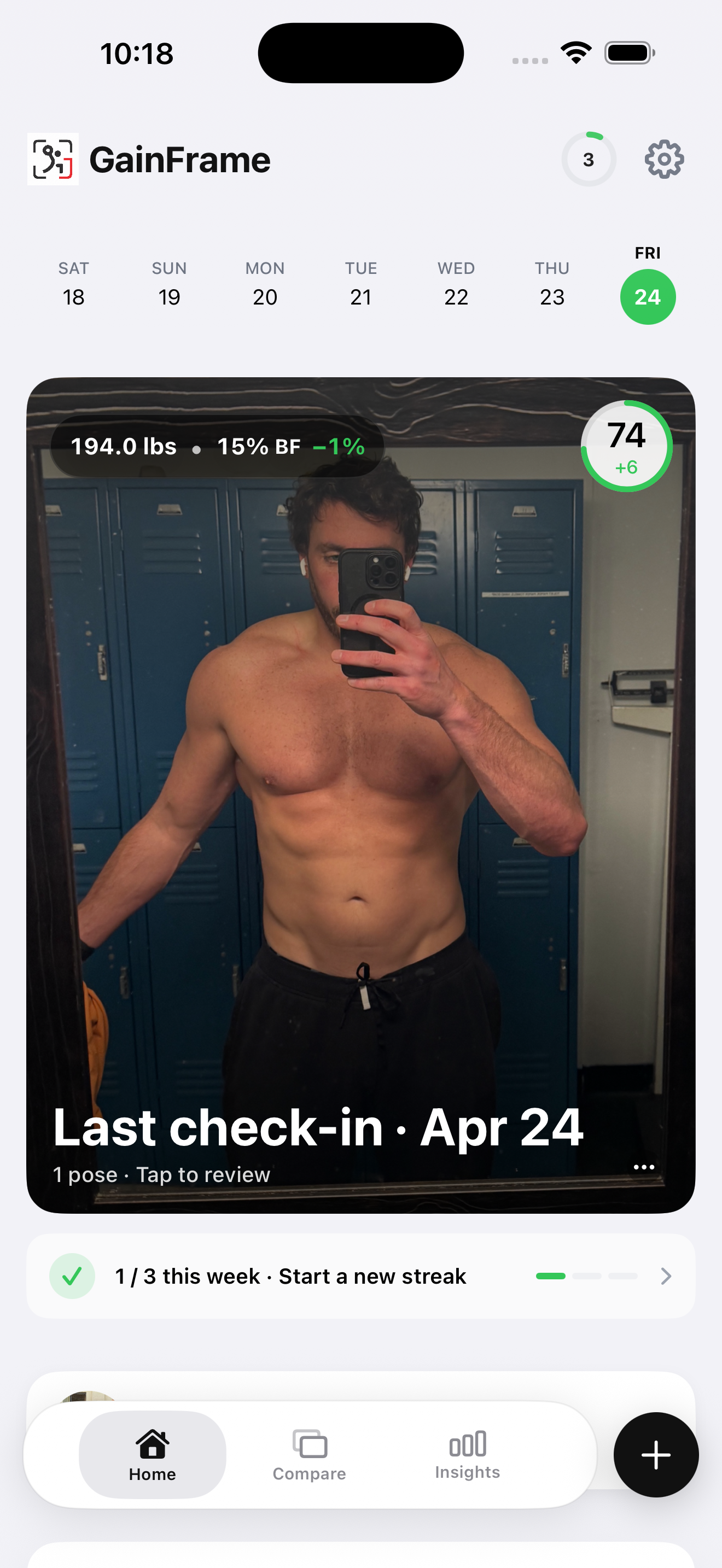
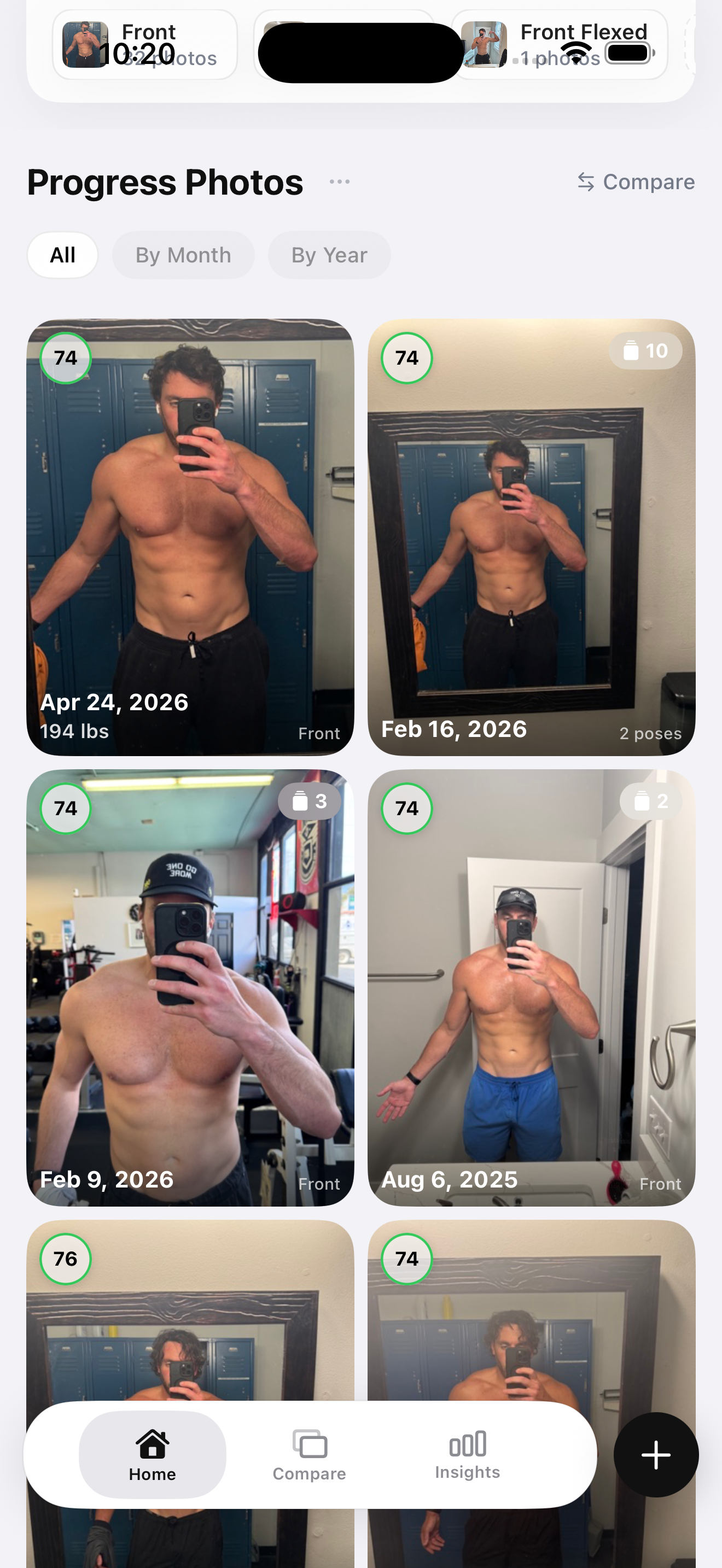
GainFrame is built iPhone-first and uses the iOS stack hard. Photos are stored as HEIC, so a year of weekly check-ins lands at a fraction of the storage of a JPEG-based app. The full archive backs up to iCloud automatically, so a new iPhone restore brings every photo and every body composition reading with it.
The Apple Health integration is the deepest on this list. Each check-in writes body fat percentage, lean body mass, and weight directly to HealthKit, which means your physique data shows up next to your activity rings and feeds anything else that reads from Health. If you log workouts in Hevy or weigh in on a connected scale, GainFrame pulls those readings in to pin against each photo.
Apple Shortcuts support is the underrated piece. You can set a Shortcut to fire every Monday at 7am, automatically open the camera at the right pose template, and log the result. That's the move that turns "I want to take progress photos consistently" into "the photo just happens." Live Photos are preserved end to end — you flex, the app captures, you pick the best frame later.
The reason this isn't a slam-dunk #1 is that GainFrame is more app than some people need. The AI body composition layer — body fat percentage, FFMI, per-muscle scoring across 12 body areas — is the whole point if you're a serious lifter. If you just want a private photo timeline, that depth is overkill, and Apple Photos (#7 below) does the simple version for free.
Best for: iPhone users who lift seriously and want photos, AI body composition, and Apple Health writes in one app.
Limitations: Pro subscription for unlimited photos. Free tier capped at 25 photos lifetime.
2. Snapsie — Cleanest simple before/after on iPhone
Price: Free with IAP
Platform: iPhone only
Snapsie does one thing — side-by-side and overlay comparisons of progress photos — and does it with iOS-native gesture polish. The pinch-to-align UI feels right on iPhone in a way that ported Android apps never quite manage. iCloud backup is built in, so your archive survives a device change.
The trade is that there's no body composition layer, no Apple Health write, no Shortcuts support. It's a focused photo comparison app, not a tracking system. If your mental model is "I want a clean before-and-after I can show people," Snapsie is the right tool. If you want data attached to those photos, this isn't it.
Best for: iPhone users who want polished before/after comparisons and don't need analytics.
Limitations: No body composition, no Apple Health, no Shortcuts. Pure photo utility.
3. Metamorph — Best for privacy-first iPhone users
Price: Free with subscription
Platform: iPhone only
Metamorph leans hard on a privacy and anti-AI marketing angle. All photos stay on device, the app doesn't ship anything to a server, and authentication flows use iCloud Keychain rather than a third-party login. For people who are uncomfortable with the idea of body shots living anywhere outside their own iPhone, that posture matters.
The photo alignment tooling is good — ghost overlays, consistent pose templates, side-by-side exports — and the iOS UI feels native. The downside of the on-device-only model is that you don't get cross-device sync; if you switch from iPhone to iPad to review, the photos aren't automatically there.
No AI body composition, no Apple Health writes, no Shortcuts. It's an honest "photos and only photos" tool with a privacy ceiling.
Best for: Privacy-conscious iPhone users who want their progress photos to never leave the device.
Limitations: No body composition, no cross-device sync, no Apple Health integration.
4. SnapTrack (Apptimal) — Best as a simple iOS photo organizer
Price: Free tier + premium
Platform: iPhone only
SnapTrack from Apptimal is dead-simple in the best way. The UI is built around the iOS Photos app metaphor — a grid of thumbnails, tap to expand, swipe between dates. Photos sync to iCloud and the file structure shows up in the Files app, which means you can browse a year of progress photos from a Mac or iPad without opening SnapTrack.
The lack of analytics is the point. SnapTrack is for people who looked at the more elaborate apps and decided they just want a tagged, dated photo archive. The iCloud sync and Files app integration are the iOS features that put it above generic camera-roll albums for this use case.
No Apple Health writes, no Shortcuts, no AI. It's a photo organizer with progress tracking semantics layered on top.
Best for: iPhone users who want a simple organized archive without analytics overhead.
Limitations: No body composition, no Shortcuts, no Apple Health.
5. PicProgress — Best for timelapse video output
Price: Free with IAP
Platform: iPhone only
PicProgress is the rare app that takes the timelapse export feature seriously. You log photos consistently, and the app stitches them into a smooth video that exports straight to your Photos library — and then to AirDrop, Messages, Instagram, or wherever else you want it to land. The aligning is automatic, so the resulting timelapse doesn't have your head bouncing around between frames.
That AirDrop hand-off is a nice iOS-specific touch. Generate the timelapse, AirDrop it to your iPad or Mac for editing, and you're not waiting on a slow upload anywhere. iCloud backup keeps the source photos safe.
No Apple Health writes, no AI body composition. The app is built around the video output, not the data layer.
Best for: iPhone users who want to produce shareable timelapse videos of their transformation.
Limitations: No body composition or analytics. Best as a complement to a tracking app, not a replacement.
6. Hevy — Best if photos are a side-feature alongside lifting
Price: Free with Pro subscription
Platform: Cross-platform, iOS-first
Hevy is the best workout tracker in 2026 and the iOS app is its strongest build. Native dark mode, Apple Health integration that pulls workouts back to HealthKit, an Apple Watch companion that's actually useful (start a workout from your wrist, log sets without pulling out your phone). The progress photo feature is a journal-level attachment — you can pin an image to a workout entry, and that's the extent of it.
If you're already logging every set in Hevy, the photo-attachment feature is a nice extra without forcing you to open another app. The limitation is that "photo attached to a workout" isn't the same as "longitudinal physique tracking." There's no body fat estimate, no muscle scoring, no comparison view across months. Hevy plus a dedicated physique app — its Hevy + GainFrame integration is the exact stack we built for this — is the way to go if you want both views.
Best for: iPhone lifters whose primary lens is workout volume and who want photos as a journal layer.
Limitations: No body composition or photo timeline. Pair with a tracking app.
7. Apple Photos with Hidden Album — Free, private, surprisingly good
Price: Free (built-in)
Platform: iPhone (works on iPad and Mac too)
The honest answer for a real subset of people is: don't install another app. The Hidden Album in Apple Photos is gated behind Face ID by default in iOS 16 and later, syncs across every device you sign into iCloud on, stores in HEIC for free, supports Live Photos natively, integrates with everything (AirDrop, Files, Mail, Messages), and never asks for a subscription.
The workflow is simple: take a progress photo, tap Share, tap Hide. The image disappears from your main library and lands in a Face-ID-locked album. Open the Photos app a year later, scrub through the Hidden Album, and you have your archive. You can favorite specific photos to mark milestones, build albums for "before bulk" or "after cut," and the iOS Memories feature will sometimes surface a one-year-ago comparison automatically.
What you lose is everything analytics-related. There's no body fat number, no FFMI trend, no per-muscle scoring, no automatic alignment, no side-by-side comparison without screenshotting and editing yourself. If your goal is "I want a private archive I can flip through occasionally," that's not a problem. If your goal is "I want to know whether my training is producing visible results," it isn't enough.
Best for: iPhone users who want a free, private archive and don't need analytics or comparison.
Limitations: No body composition, no comparison tools, no analytics. It's a photo album, not a tracker.
iPhone progress photo apps compared
| App | Price | iCloud | HEIC | Shortcuts | AI Analysis | Best For |
|---|---|---|---|---|---|---|
| GainFrame | Free + $4.99/mo | Yes | Yes | Yes | Body fat, FFMI, muscle map | Lifters who want photos + composition |
| Snapsie | Free + IAP | Yes | Yes | No | No | Clean before/after |
| Metamorph | Subscription | On-device only | Yes | No | No | Privacy-first users |
| SnapTrack | Free + premium | Yes | Yes | No | No | Simple photo organizer |
| PicProgress | Free + IAP | Yes | Yes | No | No | Timelapse video export |
| Hevy | Free + Pro | Yes | Yes | Limited | No | Photos as workout-log attachments |
| Apple Photos | Free | Yes | Yes | Yes (system-wide) | No | Free, private archive |
iOS-specific tips no other platform can match
Whatever app you land on, these are the iPhone moves that genuinely change how progress photo tracking feels day to day. Most are five-minute setups that pay back forever.
Use the Hidden Album in Apple Photos for a free private archive
Even if you use a dedicated tracker, having a parallel archive in the Hidden Album is a free safety net. The album is gated behind Face ID by default in iOS 16+, syncs across devices, and survives any app you ever uninstall. Take the photo in your tracker, then save a copy to Photos and hit Hide. If your primary app ever goes under or you switch tools, the archive is still there.
Set up a Shortcut to "open progress photo app at 7am every morning"
Open the Shortcuts app, hit Automation, choose Time of Day, set 7am every Monday and Thursday. Add an action: Open App → your tracker. Optional: prefix with a notification ("Progress photo time"). The Shortcut fires automatically — your phone effectively asks you to take the photo, which is the difference between intention and habit. The same trick works with the Open Camera action if your app doesn't expose its own Shortcuts intent.
Keep HEIC instead of JPEG to halve storage without losing quality
Settings → Camera → Formats → choose High Efficiency. iOS will shoot in HEIC, which is roughly half the file size of JPEG with no visible quality loss. Over a year of weekly check-ins that's the difference between 200MB and 400MB of storage for the same archive. Apps that respect the format end-to-end keep that savings; some lazy ports re-encode to JPEG on import — check before you commit to one.
Use Live Photos so you can pick the best frame later
A Live Photo records 1.5 seconds before and after the shutter. For a flexed pose — where your timing on the inhale and the squeeze matters — that captures three seconds of options. Open the photo in the Photos app, tap Edit, scrub the frame slider, and pick the actual peak. Some progress photo apps preserve the Live Photo and let you do this inside the app; the rest collapse it to a single frame on import. If frame selection matters to you, check this before signing up.
Use AirDrop to send a side-by-side to your coach in two taps
Stitch a comparison in your tracker (or just shift-select two photos in the Photos app), tap Share, and AirDrop to your coach's iPhone. No upload, no compression, no cloud round-trip. It's the iOS feature that obsoletes "let me text you a screenshot of a screenshot" for anyone whose coach is also on iPhone.
The honest answer for who should use what
The decision is mostly about how much depth you actually want. Here's the matrix.
If you lift seriously and want photos plus body composition data: Use GainFrame. The Apple Health writes, Hevy integration, and per-muscle scoring are the depth that justifies installing a dedicated app over Apple Photos.
If you just want a clean before/after: Use Snapsie. It's the simplest path to a polished comparison without the analytics overhead.
If your priority is privacy and on-device storage: Use Metamorph. The on-device-only model is a real differentiator if that posture matters to you.
If you want a simple photo archive with iCloud sync: Use SnapTrack — or skip the install entirely and use the Hidden Album in Apple Photos. They occupy almost the same niche.
If you want timelapse video output: Use PicProgress. The video stitching is the feature.
If you already log every workout in Hevy: Use Hevy plus GainFrame. Hevy logs the lifts, GainFrame measures what those lifts produced, and the integration pins your workout volume to every photo.
If you don't want another app: Use Apple Photos with the Hidden Album. It's free, it's private, and for many people it's enough.
The reason iPhone is home turf for this category isn't just polish — it's that HEIC, iCloud, Shortcuts, and Apple Health turn a photo tracker from "an app I open sometimes" into a habit that runs itself. Whatever app you pick, use the iOS stack underneath it.
If you're on iPhone and want photos, body composition, and Apple Health in one app — that's what we built
GainFrame stores photos as HEIC, syncs to iCloud, supports Apple Shortcuts for one-tap check-ins, and writes body fat percentage, lean mass, and weight to Apple Health on every analysis. Live Photos preserved end to end. Free tier includes 25 photos.
Download GainFrame Free