
Connecting your lifts to your physique
One of the most powerful things about tracking a recomp with GainFrame is that it doesn't treat your photos in isolation. When you connect Hevy, your workout data automatically attaches to the progress photo taken on the same day.
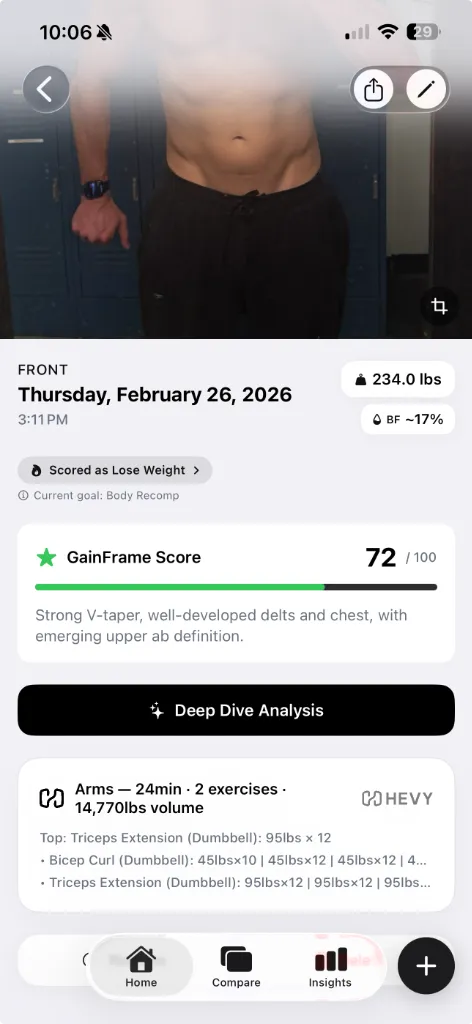
This means you can scroll through your timeline and see a direct relationship: "My bench volume went up 15% over six weeks, and my chest went from Developing to Strong." That's the kind of feedback loop that keeps you locked in during a recomp, when the scale is giving you nothing.
The proof: what a recomp actually looks like
Here's the visual that no scale in the world can give you. On the left: 245 lbs at approximately 27% body fat. On the right: 234 lbs at approximately 18% body fat. Only 11 pounds of difference on the scale, but a 9 percentage point drop in body fat and a visibly more muscular build.
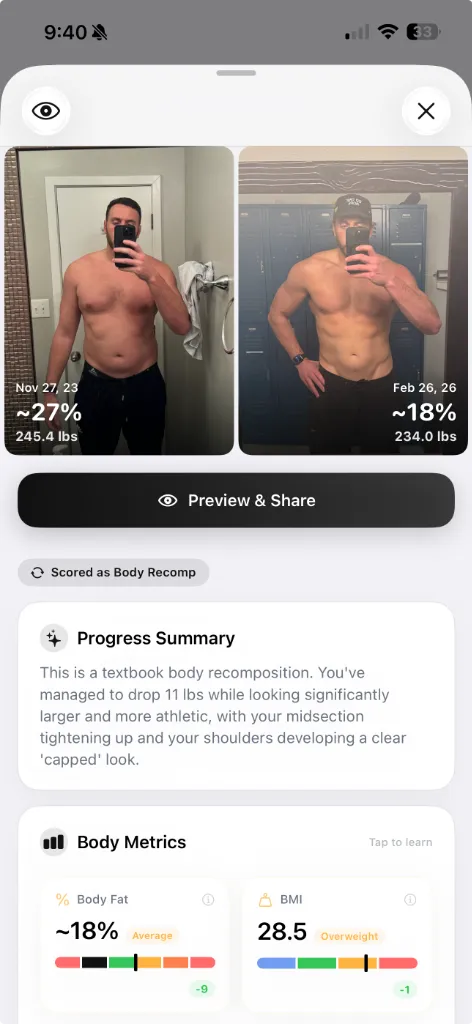
GainFrame's AI scored this as a "textbook body recomposition", recognizing that the midsection tightened up, the shoulders developed a clear capped look, and the overall physique became significantly more athletic despite minimal scale change.
A recomp doesn't show up on a scale. It shows up in a photo. AI analysis is the fastest way to quantify exactly how much progress you've made, so you never second-guess a successful program again.
For a seasonal training block, use the Winter Arc photo check-in schedule to choose repeatable dates and poses before your first check-in.
How to start tracking your recomp today
- Take progress photos weekly. Same pose, same lighting. Front relaxed, front flexed, and side are the best three angles for tracking recomp.
- Import your existing gym selfies. GainFrame can analyze photos from your camera roll, you probably already have months of data sitting there.
- Run AI analysis monthly. Tap a photo and get body fat, FFMI, muscle group scores, and a GainFrame Score. Track the trend, not individual readings.
- Connect Hevy. Let your workout data auto-attach to each photo so you can correlate training volume with visual changes.
- Stop checking the scale daily. Weigh yourself if you want, but use the weekly average for context, not as your primary metric during a recomp.
Your gym selfies aren't vanity, they're the most accurate dataset you have. Stop letting a piece of glass on your bathroom floor tell you nothing is happening.
What else should you know?
How often should you take body recomposition photos?
Take photos weekly with the same pose, framing and lighting. Compare dates far enough apart to see accumulated change, and keep the original images in order. Use your training log, waist measurements and weight trend for context. A photo can show visible change, but it cannot directly measure muscle tissue.
Can progress photos prove you gained muscle and lost fat?
Photos can support a body recomposition assessment when visible changes agree with your training performance and other measurements. They cannot prove an exact amount of muscle gained or fat lost. Pose, lighting and camera distance affect appearance, while AI composition numbers are estimates with their own limitations.
How can workout data help you interpret progress photos?
A training log adds context to the changes you see between photographs. Keeping exercise, set and volume records beside a dated check-in can help you review your routine over time. An association between training and a photo score does not by itself establish how much muscle a particular exercise built.
Related Articles
- 7 Best Body Transformation Apps in 2026 (Ranked & Compared)
- How to Measure Muscle Gain Without a Scale
- Import Progress Photos Into a Body Transformation Timeline
- Best Body Fat Calculator from Photo: Why AI Beats Smart Scales
- Deep Dive Compare: Quantify Exactly What Changed
- How to Calculate Body Fat from a Photo Using AI