
Quick answer: Track four inputs: weight, body composition, nutrition, and strength. GainFrame now combines weight context, photo-based composition, calorie and macro targets, and multi-input food logging in one iOS app. Add Hevy or Strong for a detailed strength log, and use a dedicated nutrition app only if you prefer its deeper coaching.
Search for "best app to track Ozempic weight loss" and you'll get a list of apps centered on body weight and calories. Weight is useful, but it does not identify how fat mass, lean mass, water, or other components changed.
Consumer apps cannot make that diagnosis either. Their value is organizing several repeatable signals in one place: weight, body composition estimates, nutrition records, and strength performance. If weight loss, weakness, side effects, or reduced intake concerns you, bring the record to your prescriber or a registered dietitian.
This guide covers the 11 apps worth considering for tracking a GLP-1 transformation, including the ones marketed specifically to Ozempic users. The honest answer is that you need four inputs, but you do not always need four separate apps. Here is the stack.
If you already use WW, our WeightWatchers Body Scanner review explains its published features and why a rising lean-mass percentage alone does not establish muscle gain.
1. Why one app isn't enough on a GLP-1
There are four things you need to track if you want to come out of a GLP-1 cut with a body that looks better, not just lighter:
Weight trend. The baseline. Day-to-day weight is noisy because of water and food in your gut; the weekly trend line is the signal. Any smart scale plus a free dashboard handles this.
Body composition. A repeatable estimate adds context that scale weight cannot provide. Photo analysis and consumer BIA still cannot diagnose tissue loss, so compare trends under consistent conditions and involve a clinician when a change concerns you.
Nutrition, protein especially. Appetite suppression can make adequate intake harder. Tracking calories and macros gives you a record to discuss with your prescriber or a registered dietitian, but an app should not set clinical nutrition guidance or tell you to change medication.
Strength. A workout log gives you a practical functional trend alongside weight and composition estimates. Strength can also move because of energy intake, sleep, technique, or training changes, so treat it as one signal rather than proof of muscle gain or loss.
No single app is deepest in all four categories. Noom and Lose It! combine weight and calories without much composition detail. Spren and SKOR focus on composition without a full food diary. GainFrame now combines photo-based composition, weight context, calorie and macro targets, multi-input food logging, and Apple Health sync, but it still does not replace a detailed strength log or generate a full workout program.
So the working answer is a stack: pick one app per slot. Below is the slot map, then the eleven apps reviewed.
2. The 4-input stack
The four slots and the apps that fill them:
Slot 1: Weight + dashboard. Apple Health (free) or Withings Health Mate (free with their scale). Don't pay for this slot. Any smart scale you already own will sync to a free dashboard.
Slot 2: Body composition. GainFrame, Spren, or SKOR. These are tracking tools, not clinical scans, and their estimates should be read as trends.
Slot 3: Nutrition. MacroFactor or MyFitnessPal remain strong dedicated options. GainFrame also covers goal-aware calorie and macro targets plus food logging by voice, search, barcode, Nutrition Facts label, and plate photo, so its Pro users may not need a separate logger.
Slot 4: Strength. Hevy or Strong. A workout logger records sets, reps, and load so you can review the trend with the other three inputs.
Now the apps, slot by slot.
3. The 11 apps reviewed
Slot 1: Weight + dashboard
1. Apple Health
Price: Free, iOS native
What it tracks: Weight, BMI, steps, sleep, heart rate, plus anything any other health app feeds it
Role in the stack: The free baseline dashboard everyone with an iPhone should already be using
Apple Health is the dashboard that ties everything else together. Any modern smart scale (Withings, Renpho, Eufy) will auto-sync your weight to it. Any food logger pushes calories. Any workout app pushes activity. The trend graphs are clean, the data is yours, and it doesn't cost anything.
Strengths: Free. Auto-syncs from every fitness app and most smart scales. Long-term trend data is properly visualized. Privacy is genuinely solid.
Limits: iOS only. Not a body composition tool. The BF% it shows comes from whatever you fed it, usually a noisy smart-scale BIA reading. The dashboard layout takes some configuring before it shows you what you actually want to see.
Best for: Anyone on iPhone. This is the free baseline.
2. Withings Health Mate
Price: Free with a Withings scale ($90+)
What it tracks: Weight, body fat (BIA), heart rate, sleep, body shape over time
Role in the stack: The companion app for the scale, which is the right scale to buy if you don't already own one
If you don't already have a smart scale, Withings is the one to buy. The hardware syncs weight automatically, the app gives you a clean weight trend, and a "Body Comp" feature shows your weight broken into estimated lean mass, fat mass, and water. The body composition number is BIA-based, so it is noisy day to day, but the trend over weeks is usable.
Strengths: Cleanest dashboard for daily weigh-ins. Auto-syncs to Apple Health. Great trend visualization. Affordable hardware.
Limits: The body composition number comes from BIA. It is more useful for trends than absolute accuracy and is not a replacement for a clinical assessment.
Best for: People shopping for a smart scale. Buy a Withings, use Health Mate for the trend, and let it sync into Apple Health.
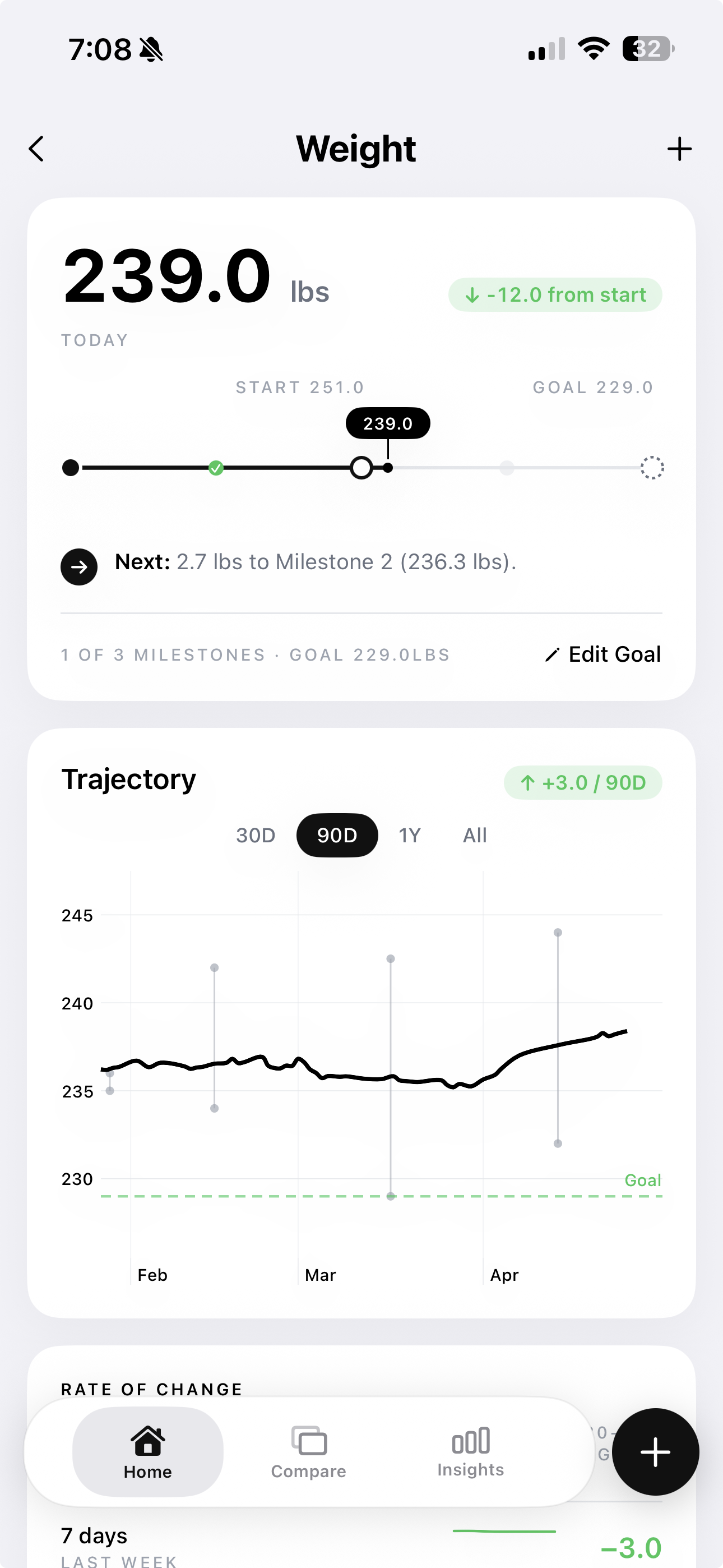
The weight trend (above, from GainFrame's integrated dashboard) is the input that drives everything else in the stack, but on its own it cannot tell you what changed. That is where Slot 2 comes in.
Slot 2: Body composition (the GainFrame slot)
3. GainFrame
Price: Free base + $5.99/mo Pro, iOS
What it tracks: Body fat %, lean mass, FFMI, individual scores for 12 muscle groups, weight context, calorie and macro targets, and a food diary
Role in the stack: The body composition slot plus integrated nutrition tracking
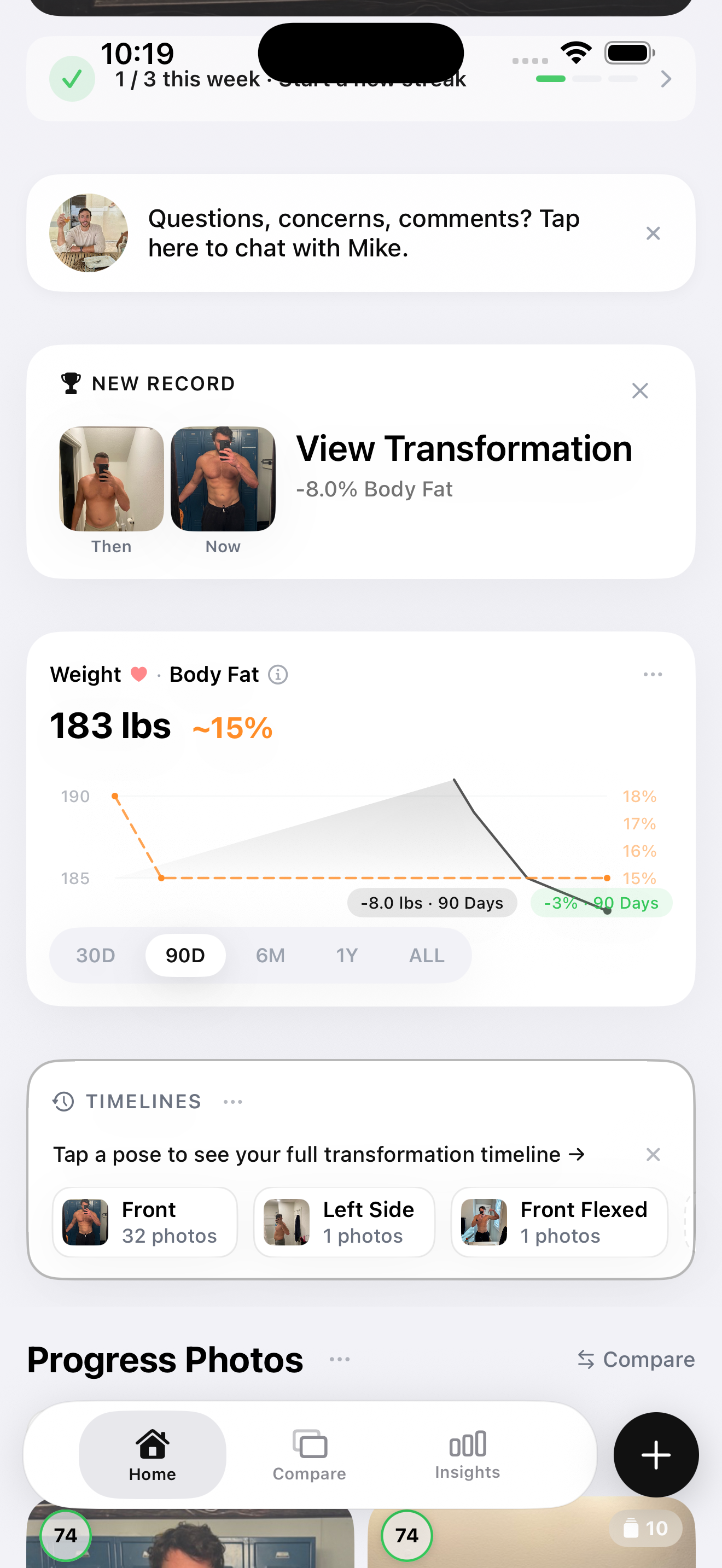
GainFrame is built around the question that GLP-1 users actually need answered: what does the photo trend show while weight changes? Every check-in photo produces a Deep Dive with body fat percentage, FFMI, a lean mass estimate, and individual scores for 12 visible muscle groups. These are AI estimates, not a diagnosis or a direct tissue measurement.
The per-muscle breakdown shows whether specific visible groups are moving differently across comparable photos. That can prompt a closer look at training, nutrition, posing, or photo consistency, but it cannot prove muscle loss or tell you to change treatment. Bring any health concern to your prescriber.
Pro costs $5.99 per month or $39.99 per year. Alongside the unlimited timeline and advanced comparisons, Pro includes goal-aware calorie and macro targets plus food logging by voice, search, barcode, Nutrition Facts label, or plate photo. Entries can sync calories, protein, carbohydrates, and fat with Apple Health.
Strengths: No extra scanner. Photo trends, weight context, and nutrition records can live in one iOS workflow. The free tier covers 25 photos.
Limits: iOS only. Photo outputs are estimates, not clinical measurements. Food matches and portions need review before saving. It does not generate a full workout program or replace a detailed strength log, clinician, or registered dietitian.
Best for: Anyone who wants photo, weight, and nutrition trends in one iOS workflow while using a separate app for detailed strength logging.
4. Spren
Price: Paid subscription, iOS + Android
What it tracks: Body fat %, body composition metrics, VO2max estimate, structured front/back photo scan
Role in the stack: The body composition slot for cross-platform users
Spren takes a more structured approach to AI body composition than GainFrame. Its protocol uses front and back photos in form-fitting clothing with specific lighting and stance, so the inputs are more controlled. Output includes body fat percentage and a VO2max estimate. It is designed for periodic assessment rather than weekly tracking, and the interface reflects that.
Spren is the right call if you're on Android, where GainFrame doesn't exist yet, or if you want a more clinical assessment format because you're working with a coach. The trade-off is depth: Spren outputs composition-level data (fat vs lean) without the per-muscle-group breakdown that catches asymmetric loss on a GLP-1.
Strengths: Cross-platform (iOS + Android). Structured scan protocol. DEXA-comparison framing in their marketing.
Limits: Subscription-only with no free tier. No muscle group breakdown. Designed for periodic assessment rather than weekly habit.
Best for: Android users, or people working with a coach who wants a structured scan format.
5. SKOR
Price: £2.99/wk to £39.99/yr
What it tracks: Body composition, face slimming tracker, and skin laxity tracker; explicitly marketed to GLP-1 users
Role in the stack: Optional add-on for GLP-1 users who care about face and skin changes alongside body changes
SKOR is the only app on this list explicitly marketed to GLP-1 users. Its "GLP-1 Progress Mode" tracks face slimming, body contour, and skin laxity over time. That is a different emphasis from the body composition and strength signals prioritized elsewhere in this roundup.
The honest trade-off: SKOR's body composition depth is lighter than GainFrame's or Spren's. You don't get the per-muscle-group breakdown, and the body fat resolution is closer to a directional check-in than a precision measurement. Face and skin tracking are the differentiators.
The combined approach is the honest one: SKOR for face and skin tracking + GainFrame for body composition + Hevy for strength. Or, if face changes don't matter to you, just GainFrame + Hevy and skip SKOR.
Strengths: The only app addressing "Ozempic face" tracking. Explicitly built for GLP-1 users. Combines body, face, and skin in one workflow.
Limits: Body composition depth is lighter than dedicated tools. Subscription is steep at £2.99/wk for the resolution you get.
Best for: GLP-1 users who care about face and skin changes alongside body composition changes. An unusually large overlap with the audience.
Slot 3: Nutrition (protein is the muscle preservation lever)
6. MacroFactor
Price: $11.99/mo, iOS + Android
What it tracks: Calories, macros, adaptive metabolism estimate, protein targets
Role in the stack: The nutrition slot if you're serious about hitting protein during the cut
MacroFactor is the strongest dedicated nutrition tracker in this roundup. Its standout feature is an adaptive expenditure estimate. Instead of keeping a fixed calorie target from a calculator, it compares logged intake with weight changes and updates its estimate over time.
The daily logger also makes it easy to compare intake with a personal protein target. Ask your prescriber or a registered dietitian for an appropriate target rather than treating an app default as clinical guidance.
Strengths: Adaptive metabolism estimate is the best in category. Clean interface. Protein targeting is exactly what GLP-1 users need.
Limits: $11.99/mo with no free tier. Food database is smaller than MyFitnessPal's.
Best for: People who want adaptive nutrition targets and a dedicated food log.
7. MyFitnessPal
Price: Free + $19.99/mo Premium, iOS + Android
What it tracks: Calories, macros, weight, exercise, and a broad food database
Role in the stack: The free nutrition option
MyFitnessPal has a broad database of restaurant, packaged, and supermarket foods. For people who do not want to type custom entries, that coverage is the reason to use it. The free tier can track calories and macros, while the premium tier ($19.99/mo) costs more than MacroFactor and offers a different feature set.
The honest comparison: MyFitnessPal wins on database breadth and the free tier; MacroFactor wins on adaptive targeting. For someone who wants to avoid another subscription, the MyFitnessPal free tier covers basic calorie and macro logging. For someone paying for one dedicated nutrition app, MacroFactor is the better choice in this ranking.
Strengths: Largest food database. Genuinely usable free tier. Cross-platform.
Limits: Less sophisticated calorie math than MacroFactor. Premium tier is more expensive than MacroFactor for less functionality.
Best for: Budget-conscious users who want a free option, or anyone who eats out a lot and needs the broadest database.
Slot 4: Strength (the muscle preservation proof)
8. Hevy
Price: Free + $4.99/mo Pro, iOS + Android
What it tracks: Sets, reps, weights, workout history, top set progression
Role in the stack: The strength slot and a practical functional trend
Hevy is the cleanest workout logger available right now. Free tier handles unlimited workouts, full exercise library, and progression tracking. Pro ($4.99/mo) adds advanced analytics and unlimited routine slots. For a GLP-1 user, the value is simple: log your top set on the major lifts every session, and watch the trend during your cut.
If your bench, squat, and pull-up trends change while weight drops, the log gives you context to review. It is not proof of tissue change because sleep, energy intake, technique, and programming can all affect performance.
Strengths: Free tier covers everything most people need. Clean interface. Cross-platform.
Limits: Doesn't tell you about composition or nutrition. It is strength only, by design.
Best for: Anyone lifting weights during a GLP-1 cut. The strength slot in the stack.
9. Strong
Price: Free + $4.99/mo Pro, iOS + Android
What it tracks: Sets, reps, weights, workout history
Role in the stack: Alternative strength logger if you prefer Strong's UI
Strong does the same job as Hevy with a different interface. Pricing is identical, the feature set is comparable, and the choice between them comes down to which UI you find more pleasant to use during a workout. Both will give you a clean record of your top sets across the major lifts.
Strengths: Same core functionality as Hevy. Slightly different interface preferences.
Limits: Same. It is strength only, by design.
Best for: People who prefer Strong's interface over Hevy's.
Cross-cutting all-in-ones (the temptation)
10. Lose It!
Price: Free + $39.99/yr Premium, iOS + Android
What it tracks: Calories, weight, food log, basic exercise
Role in the stack: Covers Slot 1 + Slot 3 only, not body composition or strength
Lose It! is a popular general-purpose weight-loss app. It tracks weight and calories, has a barcode scanner, and produces a tidy weight-loss timeline. For someone whose only goal is weight on the scale, it's a competent tool.
For a GLP-1 user, it's not enough. There is no body composition tracking, no per-muscle-group breakdown, no strength logger. You can use Lose It! to track calories and weight during your cut, but you'd still need a body composition tool and a workout logger to know whether the cut is working. At that point you might as well use MacroFactor for nutrition and skip the all-in-one framing.
Best for: Pre-GLP-1 users tracking weight loss the old-fashioned way. Less useful once muscle preservation enters the picture.
11. Noom
Price: ~$70/mo
What it tracks: Calories, weight, behavior change content, daily psychology lessons
Role in the stack: Behavior-change program, not a body composition tracker
Noom is a psychology-based weight-loss program with a tracking app attached. The product's main value is behavior-change content, including daily lessons designed to help you build sustainable habits around food. The tracking layer (calories, weight) is competent but not the focus.
For GLP-1 users, the gap is the same as Lose It!: no body composition tracking, no muscle group data, no strength logger. The price (~$70/mo) is also significantly higher than MacroFactor, MyFitnessPal Premium, or any of the body composition tools. The behavior-change content can be valuable for people who specifically want that, but it doesn't replace the four-input stack.
Best for: People who specifically want behavior-change coaching. Not a substitute for body composition tracking on a GLP-1.
4. Comparison table
| App | Price | Slot | What It Tracks | Best For |
|---|---|---|---|---|
| Apple Health | Free | 1: Weight | Weight, BMI, sleep, dashboard | Free baseline on iPhone |
| Withings Health Mate | Free w/ scale ($90+) | 1: Weight | Weight, BIA composition | Smart-scale shoppers |
| GainFrame | Free + $5.99/mo Pro | 2 + 3 | Photo composition, weight context, calories, macros | Composition + nutrition in one iOS workflow |
| Spren | Subscription | 2: Body comp | BF%, VO2max | Android users; coaching workflows |
| SKOR | £2.99/wk to £39.99/yr | 2: Body comp | Body comp + face + skin | Face and skin tracking |
| MacroFactor | $11.99/mo | 3: Nutrition | Calories, macros, adaptive TDEE | Adaptive nutrition targets |
| MyFitnessPal | Free + $19.99/mo | 3: Nutrition | Calories, macros, food database | Free nutrition tracking |
| Hevy | Free + $4.99/mo | 4: Strength | Sets, reps, top sets, progression | Workout logging on a cut |
| Strong | Free + $4.99/mo | 4: Strength | Sets, reps, workout history | Hevy alternative |
| Lose It! | Free + $39.99/yr | 1 + 3 only | Weight + calories | General weight loss |
| Noom | ~$70/mo | 1 + 3 + coaching | Weight + calories + psychology | Behavior-change focus |
5. SKOR in particular: the GLP-1-specific app
SKOR deserves its own section because they're the only app in this list explicitly marketed to GLP-1 users, and the angle is worth considering on its own terms.
What SKOR does well. Its "GLP-1 Progress Mode" tracks face slimming, body contour, and skin laxity over time. Most body composition apps either ignore the face or treat it as a secondary metric. SKOR makes face and skin changes a first-class feature.
What SKOR does less well. Body composition depth is lighter than GainFrame or Spren. There's no per-muscle-group breakdown, the body fat resolution is more directional than precise, and £2.99/wk is steep for the body composition rigor you get. SKOR is better suited to the separate question of how the face and skin are changing.
Best for: GLP-1 users who care about face and skin changes alongside body changes. That's an unusually large overlap with the audience, which is part of why SKOR's positioning works.
The combined approach. If you care about all of it, use SKOR for face and skin, GainFrame for body composition and integrated nutrition, and Hevy for strength. Add MacroFactor only if you prefer a dedicated adaptive nutrition tracker. SKOR fills a specific slot, but it is not an all-in-one tracker.
6. The free-only stack
For someone who refuses to pay for any of this:
Slot 1: Weight. Apple Health (free). Pair with whatever smart scale you have, or with manual entries from a $20 dumb scale.
Slot 2: Body composition. GainFrame's free tier includes 25 photos with AI estimates and visual trends. Plain progress photos are another free option, but they document change without estimating composition. See the best free progress photo apps for the trade-offs.
Slot 3: Nutrition. MyFitnessPal free tier. Its calorie and macro logging work without paying.
Slot 4: Strength. Hevy free tier. Unlimited workouts, an exercise library, and progression tracking make the free tier usable.
This free stack gives you a starting record across all four inputs. Every body composition output remains an estimate, and no app can turn a photo into a clinical measurement.
Frequently asked questions
What should I track while taking a GLP-1?
Track four separate signals: a weight trend, body composition estimates, calorie and macro intake, and strength performance. Each has limits, so read them together and bring concerning changes to your prescriber. Apps can organize the record, but they cannot diagnose tissue loss, prescribe nutrition, or determine whether your medication should change.
Can GainFrame log food?
Yes. GainFrame Pro sets goal-aware calorie and macro targets and logs food by voice, typed search, barcode, Nutrition Facts label, or plate photo. You review food matches and portions before saving. Entries can sync calories, protein, carbohydrates, and fat with Apple Health. It does not generate a full workout program.
Can an app tell whether I lost fat or muscle?
No app can prove from a photo or smart-scale reading exactly how much fat or muscle you lost. Photo analysis, BIA scales, weight, and strength logs are estimates or indirect signals. Consistent conditions make trends more useful. A clinician can advise on whether you need DEXA or another assessment and how to interpret changes.
Do I still need MacroFactor or MyFitnessPal?
A separate nutrition app is optional. If GainFrame Pro's food diary and targets fit your workflow, it can cover nutrition alongside photo trends. Use MacroFactor if you want adaptive expenditure estimates, or MyFitnessPal if you prefer its broad database and free tier. Tool choice is personal, and clinical targets should come from a qualified professional.
Should an app set my protein or calorie target on a GLP-1?
No. An app can calculate a starting estimate and help record intake, but appetite, medical history, side effects, and your treatment plan require individual judgment. Ask your prescriber or a registered dietitian for appropriate calorie and protein guidance. Do not change medication or diet based only on an AI photo, weight trend, or automated target.
7. The honest verdict
Pay only for the gaps that matter to your workflow. GainFrame Pro can cover body composition and nutrition in one subscription, while Apple Health handles weight and Hevy's free tier handles strength.
The minimum paid setup in this ranking is $5.99 per month for GainFrame Pro, with Apple Health for weight and Hevy's free tier for strength. That includes calorie and macro targets plus the food diary. Add MacroFactor only if its adaptive nutrition workflow is worth a second subscription to you.
That is the honest stack. Four inputs still matter, even when one app covers more than one. Layering photo estimates, nutrition records, weight, and strength gives you more context than the scale alone, but it does not diagnose muscle loss or replace clinical guidance.
A note: this is not medical advice. Talk to your prescriber about the medication and to a qualified clinician about nutrition or possible muscle loss. These apps organize personal tracking data; they do not determine treatment.
Put composition and nutrition in one workflow
GainFrame combines photo-based body composition estimates, weight context, calorie and macro targets, and flexible food logging. Pair it with a strength log and review health decisions with your clinician.
Download GainFrame Free